Create and copy your Meta access token
Easily create and copy your Access Token to activate the Conversion API and improve the tracking reliability of your server events, even without cookies.
Written By Baptiste Lorreyte
Last updated 6 months ago
The access token allows you to send your conversion events directly to Meta's servers, without relying on the user's browser.
With this method (called the Conversion API), you benefit from more reliable tracking, even when cookies are blocked or ad blockers are in use.
Why use an Access Token?
The Access Token enables:
More robust server-to-server tracking
Greater reliability of conversion data
Sending events via the browser and via the API, for optimal redundancy
Steps to create your Access Token
1. Open the Event Manager
Open the Meta main menu
Click on Events Manager
You can also access it directly via the Meta interface dedicated to events.
2. Access your Pixel settings
Select the relevant Pixel
In the left-hand menu, click Settings
3. Generate the access token
Scroll down to the Server-side API for the Web section
Click Create access token
Follow the steps provided
During this process, you will be asked to:
Select the Pixel
Create or select an application
Create or select a system user
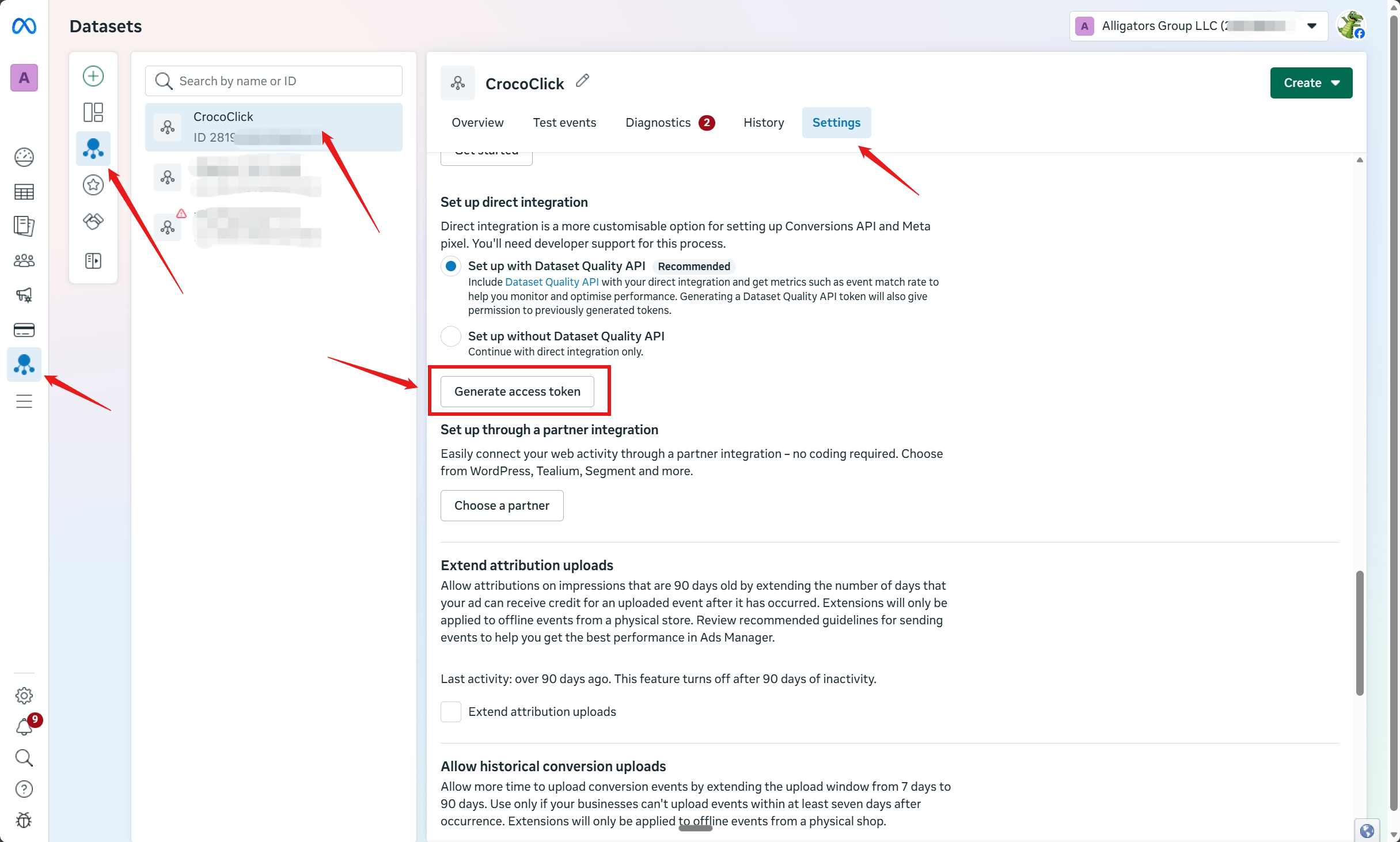
4. Copy and save the token
Once generated, the token will be displayed
Click on it to copy it
Keep it safe
👉 This token is required to authenticate the sending of events via the API
Using the access token
Once your Access Token has been created and copied, you can:
Configure events via the Conversion API
Ensure stable and accurate tracking of your conversions
Reduce data loss caused by browsers or ad blockers
Best practices
Never share this token publicly
Store it in a secure location
Use it only for sending server events
If you have correctly generated and copied your access token, you are ready to set up reliable, sustainable, and high-performance server tracking.
💡TIP: To do this, we recommend reading the article Connecting the Pixel and the Facebook Conversion API to CrocoClick for your funnels