Everything You Need to Know About CrocoClick Pricing: Subscriptions, Credits, and Premium Options
Learn about CrocoClick's pricing and rates: flexible subscriptions, pay-as-you-go credits, and additional services tailored to your business.
Written By CrocoTeam
Last updated 3 months ago
In this article, we’ll explain how CrocoClick’s pricing works in a simple and transparent way.
Our model is based on three key pillars:
Subscription
Credits
Premium Options
Each section answers a specific question to help you better manage your expenses and optimize your use of the platform.
How do you manage your billing?
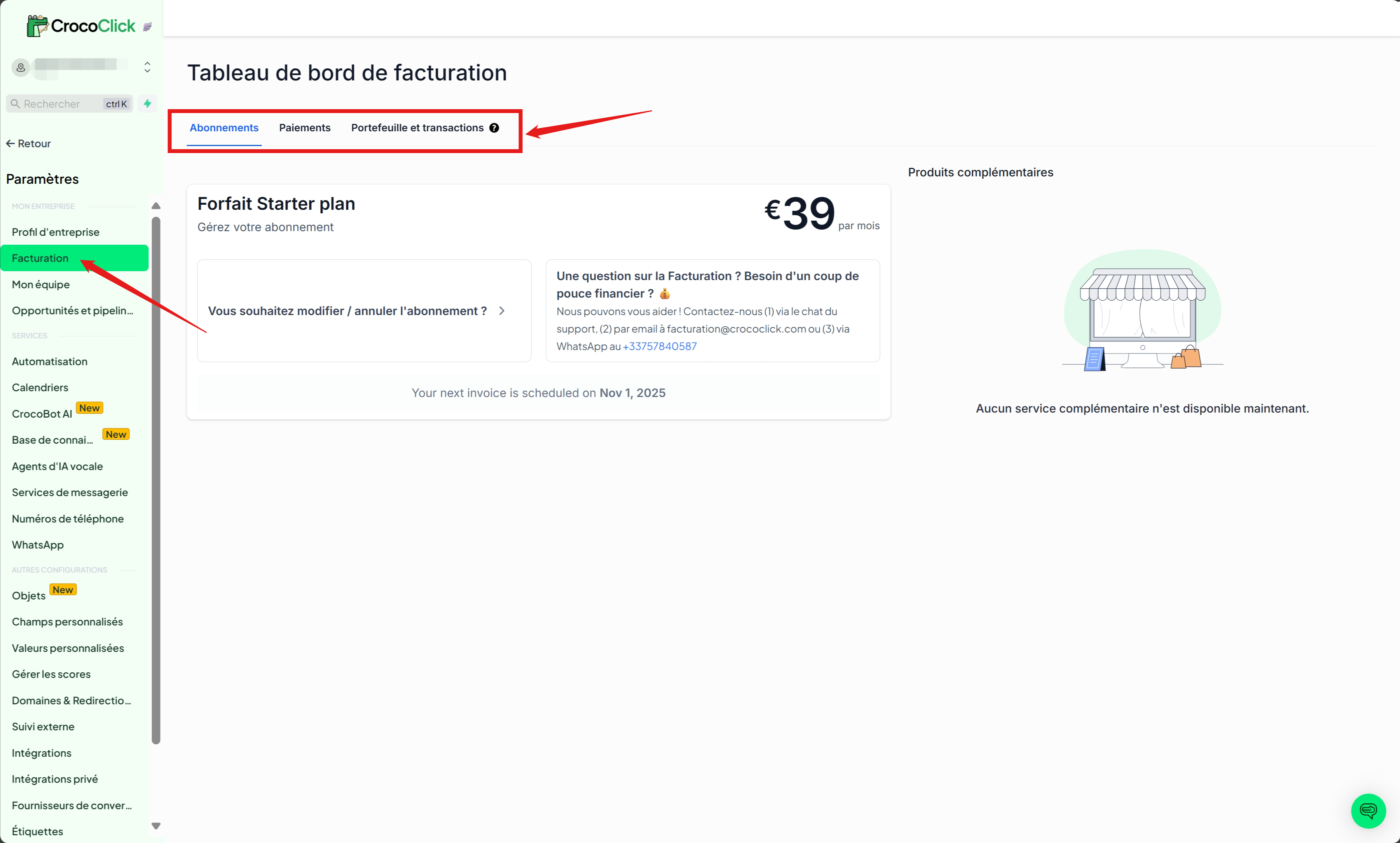
You can view all charges made to your account, manage your subscription, track your credit balance, and much more—all directly from your CrocoClick app.
Simply log in to your CrocoClick Account, then go to Settings → Billing & Payments.
Every transaction is listed there in detail.
This is an essential tool for tracking, understanding, and optimizing your spending on CrocoClick.
1. The Subscription
What Is the Subscription?
The subscription is your gateway to CrocoClick.
Regardless of your subscription plan, you have access to all of the platform’s standard features and receive a fixed number of monthly credits to launch your marketing campaigns.
The differences between the plans are:
The contact limits in your CrocoClick CRM
The number of monthly credits provided
Our Subscription Plans
💡TIP: In addition, for those who are interested, there’s a subscription to CrocoLive—our live streaming software—which is 100% integrable with CrocoClick. To learn more, read our article"Everything You Need to Know About CrocoLive's Pricing"
Our Philosophy – Why These Subscription Plans?
We firmly believe that we should offer all features starting with even the most basic plan so that you can lay the foundation for a solid business right from the start, without any limitations.
This reflects our values of freedom and ambition.
As you manage more contacts and your business grows, you’ll be able to invest more as you expand...
...and that’s what’s reflected in our plans.
P.S.: And the inclusion of free monthly credits ensures a quick start with no surprises, helping you scale up with confidence.
2. Credits
What Is the Credit System?
Credits are CrocoClick’s currency.
They track your use of communication channels (emails, texts, calls, etc.) and let you pay only for what you use.
How Credits Work
Wallet & Free Credits: Each subscription plan includes a set amount of free monthly credits, enough for “normal” use.
💡TIP: For example, the Essential plan includes $10 in credits, which is enough to send up to 10,000 emails per month.
On-Demand Usage: Credits serve as currency to pay for your outbound communication activities (emails, texts, calls, AI, etc.).
Automatic Top-Up: To ensure uninterrupted service, as soon as your credit balance reaches zero, your wallet is automatically topped up in $10 increments.
Actions That Consume Credits
Here, we use the costs for France as a reference, as it is one of the most expensive countries in terms of credit costs.
a) Communication
To learn more:
b) Automations
💡TIP: As part of our additional services, we also offer “packs” of 10,000 premium actions for $25/month
c) Artificial Intelligence
To learn more:
Workflow AI: Your AI co-pilot for automatically creating automations
AI Reviews: Your community manager who responds to your reviews or simply suggests a response
Funnel AI: Your AI co-pilot for automatically creating your pages, websites, and funnels
Our Philosophy: Why a credit system?
Pay for what you use: Rather than committing to a fixed plan (for example, 20K emails for €40/month), you receive free credits included in your subscription that cover your normal needs, and you only pay if you go beyond that baseline.
Transparency and Flexibility: This credit system adapts to your actual usage, whether you’re in a slow period or experiencing rapid growth.
Freedom and Optimization: By eliminating costs associated with unused services, we enable you to invest wisely and pay only for the actual impact of your actions.
Security During Peak Usage: Unlike some platforms that promise “false” unlimited plans, CrocoClick guarantees a truly uninterrupted experience (with no restrictions for “abnormal usage”).
3. Premium Options
What Are Premium Options?
Premium options are add-on services that enhance your CrocoClick experience.
They are not included in the basic subscription and can be activated according to your specific needs.
To take it further:
Learn more:
4. FAQ
What is an SMS segment?
An SMS segment refers to how messages are split, stored, and sent by carriers.
💡Why it matters: A single SMS message can be split into multiple segments, which affects the total cost per message sent.
What’s the difference between subscriptions, credit-consuming actions, and premium options?
Subscriptions: Determine access to CrocoClick’s basic features and the maximum number of contacts you can manage.
Credit-based actions: These refer to pay-as-you-go services (emails, SMS, calls, verifications, and AI tools) that are billed based on actual usage and deducted from your wallet.
Premium options: These are additional services (such as WhatsApp, WordPress hosting, white-label mobile apps, etc.) available for an extra fee, allowing for advanced customization of your experience.
Why was I charged €9.72 (or any other amount between €9 and €10)?
This charge corresponds to the automatic recharge of your CrocoClick wallet.
When your wallet balance reaches 0, it is automatically reloaded in increments of $10 (or the equivalent in euros) to ensure uninterrupted service.
What is a “contact” in CrocoClick?
A contact is any person registered in your CrocoClick CRM.
This includes:
People added manually by you or your team.
Prospects or customers imported from a file.
Leads collected via your forms, capture pages, or funnels.
People automatically imported from your social media accounts, emails, or phone calls.
👉 Regardless of how a contact is added (social media, email, phone, CSV import, etc.) or their status, as soon as a person is saved in the Contacts section, they count toward your subscription limit.
💡 TIP: The same person is counted only once, even if you have multiple pieces of information about them (email and phone number, for example). We count by “contact record.”