De-index some of your CrocoClick pages to prevent them from being referenced
Add the robots noindex tag to de-index and hide your utility pages from Google results in just 1 minute.
Written By CrocoTeam
Last updated 6 months ago
Don't want your thank-you or confirmation pages to appear in Google? In just a few seconds, add the noindex tag and keep these URLs out of search results.
Why deindex certain pages?
Privacy: prevent a thank-you message or internal form from being publicly visible.
Clean SEO: Focus your site’s authority on strategic pages rather than utility pages.
Step-by-step guide
Open the page to be deindexed using the CrocoClick builder
Go to the SEO settings
Click the “SEO Metadata” icon in the top bar of the editor.
Go to “Links and Keywords” and add a custom tag
Tag name:
robotsContent:
noindex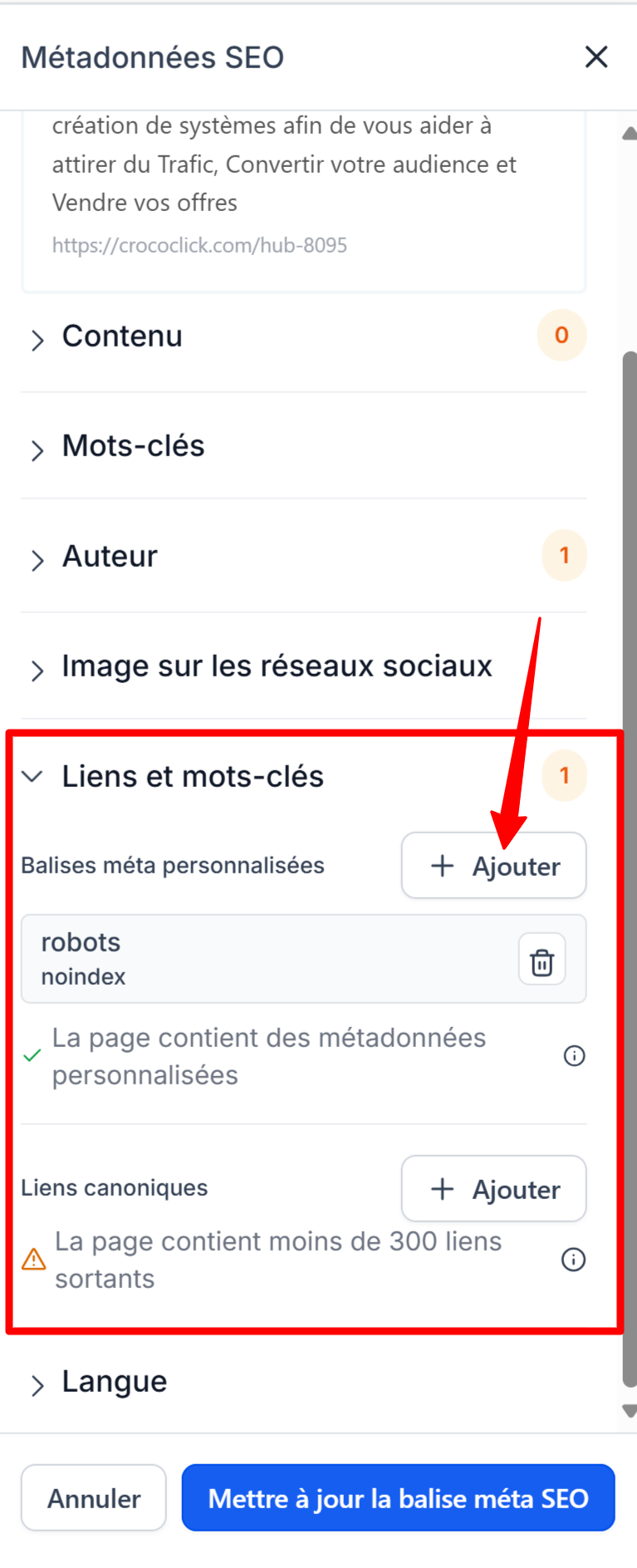
Update the SEO meta tag and save the page.
With this simple method, your utility pages remain private and your SEO stays focused on what matters most! 🐊