How to test the operation of an order form in a Sales Funnel
How to test a funnel in CrocoClick using the "test" mode and fake Stripe cards to simulate a fictitious sale
Written By CrocoTeam
Last updated 8 months ago
When creating a sales funnel in CrocoClick, it is essential to ensure that everything is working properly before launching your offer to the general public.
To do this, CrocoClick offers a "test" mode that allows you to perform sales simulations without committing to actual bank transactions.
In this article, we will see how to activate this "test" mode and use fake Stripe cards to ensure that your funnel is ready to go live.
1. Why test your funnel in "test" mode?
Check that the customer journey is working properly: Test mode allows you to replicate the journey of a potential buyer (access to the sales page, payment order, order confirmation, etc.) without the risk of payment errors and without impacting your actual sales statistics.
Identify and fix bugs: You can spot any errors (display issues, inactive links, non-functional form fields) before your real customers encounter them.
Test automations: If you use post-purchase automations, now is the time to check that everything triggers as expected.
2. Activate "test" mode in CrocoClick
Access the funnel settings
Log in to your CrocoClick account.
Go to Sites > Funnel
Open the funnel you want to test.
Go to the Settings section of this funnel.
Enable "test" mode
In the payment settings, find the "Payment Method" option and disable "Live" mode to enable "Test" mode.
Save your changes.
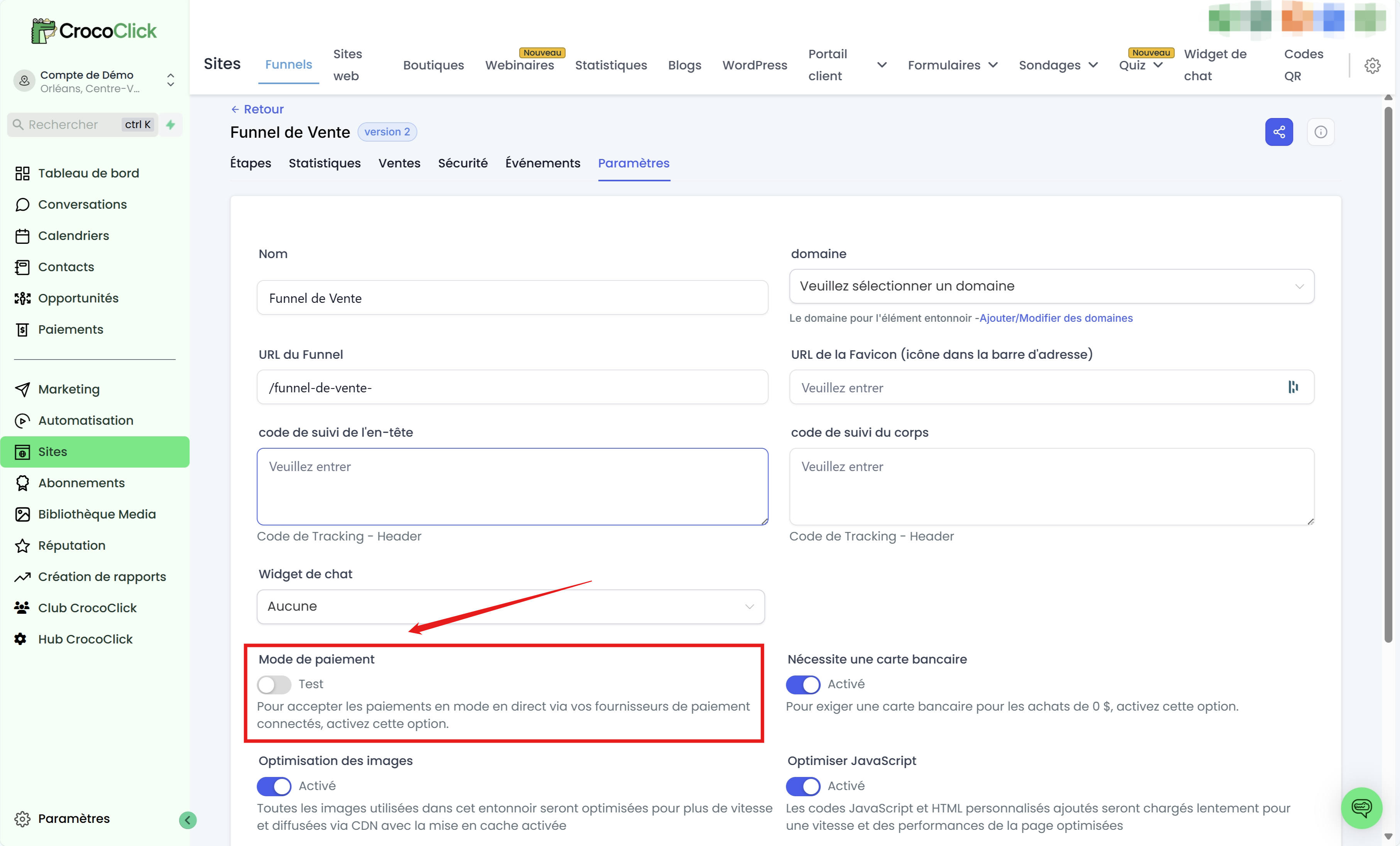
Check the test environment
Once activated, you are in test mode.
You can proceed to purchase your own product with fake Stripe cards in the next step.
3. Use fake Stripe cards
Stripe provides a series of "fictitious" credit cards (fake Stripe cards) to allow you to test different payment scenarios. Here are some examples of frequently used cards:
Classic card number that results in a successful payment:
4242 4242 4242 4242Expiration date: any date in the future (e.g., 12/30)
CVC: any 3-digit combination (e.g., 123)
Card that simulates a declined payment:
4000 0000 0000 0002This card is supposed to generate a payment refusal in order to test error handling in your funnel.
Card that simulates a 3D Secure test:
4000 0027 6000 3184This card will allow you to verify the authentication process (3D Secure pop-up, etc.).
To perform a test:
Go to your funnel's order page in test mode.
Enter the card information (number, date, CVC) from the list of test cards provided by Stripe.
Confirm the order and observe the transaction behavior.
💡TIP: To learn more and access all Stripe test cards, see this dedicated article -> Test card numbers | Stripe documentation
4. Check the test results
After initiating one or more test transactions:
Check notifications and emails
Verify that all automatic emails related to the order (payment confirmation, access to a digital product, etc.) have been triggered correctly.
If you use automations, make sure that the test contact has been added to the automation and that it has worked as expected.
Review payment data in Stripe and CrocoClick (optional)
In your Stripe account, check that the test payments appear in the Transactions section (with the mention "Test data" if test mode is enabled).
Go to the "Payments" tab to confirm that the test transaction went through.
5. Disable "test" mode and switch to "live"
Once you have validated all the tests and are satisfied with how your funnel is working:
Return to your funnel settings in CrocoClick,
Go to the funnel settings
Deactivate test mode to activate "live" mode
Conclusion
CrocoClick's "test" mode, combined with fake Stripe cards, allows you to simulate all possible scenarios when setting up your sales funnel: successful payments, declined payments, 3D Secure, etc.
These tests are essential to ensure an optimal customer experience and avoid unpleasant surprises when you officially go live.
Take the time to check everything in detail: purchase process, confirmation emails, CRM, automations, then switch to production mode (the famous "live" mode) with complete peace of mind.
By following these steps, you can effectively test your CrocoClick funnel and then offer your visitors a smooth and professional payment experience.
Happy testing and happy selling!