Applying coupons to subscription products
Find out how to apply coupons to subscriptions in CrocoClick: limited duration, recurring or one-off discounts, concrete examples and best practices.
Written By Baptiste Lorreyte
Last updated 7 months ago
CrocoClick coupons can now be applied to recurring subscription payments, with a customizable duration.
You can define whether a discount applies once, for several months, or for the entire duration of the subscription.
This feature offers more flexibility for your promotional offers, paid trials, and long-term acquisition strategies.
Overview
When creating or modifying a coupon, you can choose how long the discount applies to a subscription product.
👉 This duration is independent of the billing frequency (daily, weekly, monthly, yearly, etc.).
Create or modify a coupon
Access coupon creation
Go to Payments > Coupons
Click on Create a coupon or Modify an existing coupon
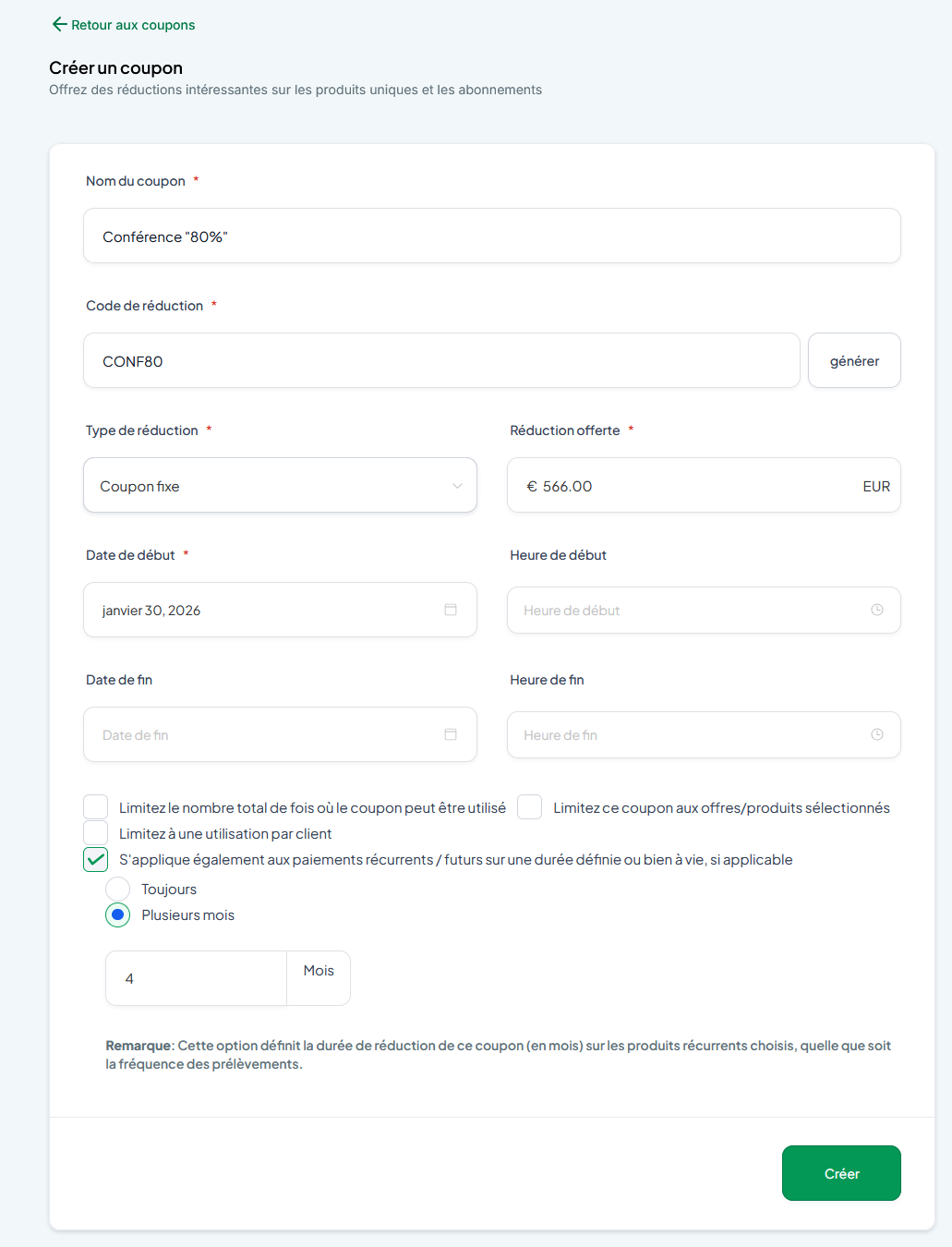
Enable the application for recurring payments
In the discount settings, check the option:
"Also apply to recurring/future payments for a set period or indefinitely"
Once checked, three options are available:
One time: The discount applies only to the first payment.
Forever: The discount applies to all recurring payments, without limit.
Multiple Months: The discount applies for a specific number of months. A field appears to enter the desired duration.
Application of coupons according to product type
Single payment products
The coupon applies only once
The duration has no impact
Subscription products
The behavior depends on the duration selected in the coupon:
One-time: Discount applied only to the first payment
Always: Discount applied to all recurring payments
Several months: Discount applied for the defined duration, then automatically stops
Display of applied coupons
The selected duration is visible:
In the coupon details
In subscription management
In the order form
Display examples:
"10% discount for the first 4 months"
"€10 discount on the first month"
"10% discount on all payments"
"€10 discount on the first payment"
Specific examples
Monthly subscription over 10 months
Coupon configured with Several months = 4
Result: Discount applied to the first 4 months, then stops
Works as soon as the subscription starts:
immediately
or after a trial period
Annual subscription over 3 years
Coupon with "Always": Discount applied to each annual renewal
Coupon with "Several months = 4"
→ Discount applied only to payments due within 4 months of purchase
→ No impact on annual renewal after 12 months
Weekly subscription over 6 months
Coupon with Several months = 2
Result: Discount applied for 2 months, or approximately 8 weekly payments
Important points to note
The billing frequency does not affect the number of discounted payments: only the duration in months counts
For planned subscriptions:
The coupon applies from the start date of the subscription
Whether the subscription starts as a trial or in active status
Best practices
Use Multiple Months for:
Entry-level offers
Launches
Extended trials at a reduced price
Always use for:
Partnerships
VIP offers
Loyalty discounts
Use once for:
Activation bonuses
Immediate purchase incentives