Use the Webhook trigger (incoming webhook)
Use the Inbound Webhook trigger to automate the import of external data (Zapier, Make) into CrocoClick.
Written By CrocoTeam
Last updated 7 months ago
The Inbound Webhook feature is an integration that allows you to automatically receive information from external software—such as Zapier—directly in CrocoClick.
When events occur in this external system (for example, a new order or a customer update), an HTTP request is sent to a specific CrocoClick URL.
This message then triggers a series of automated actions, connecting external software to CrocoClick.
💡 TIP: This trigger is a Premium feature. See our article CrocoClick Additional Services and Costs for information on the costs associated with premium automation actions.
How to add the Inbound Webhook trigger
Go to the Automation section.
In the side menu, click + Create Workflow.
Search for and add Inbound Webhook as a trigger.
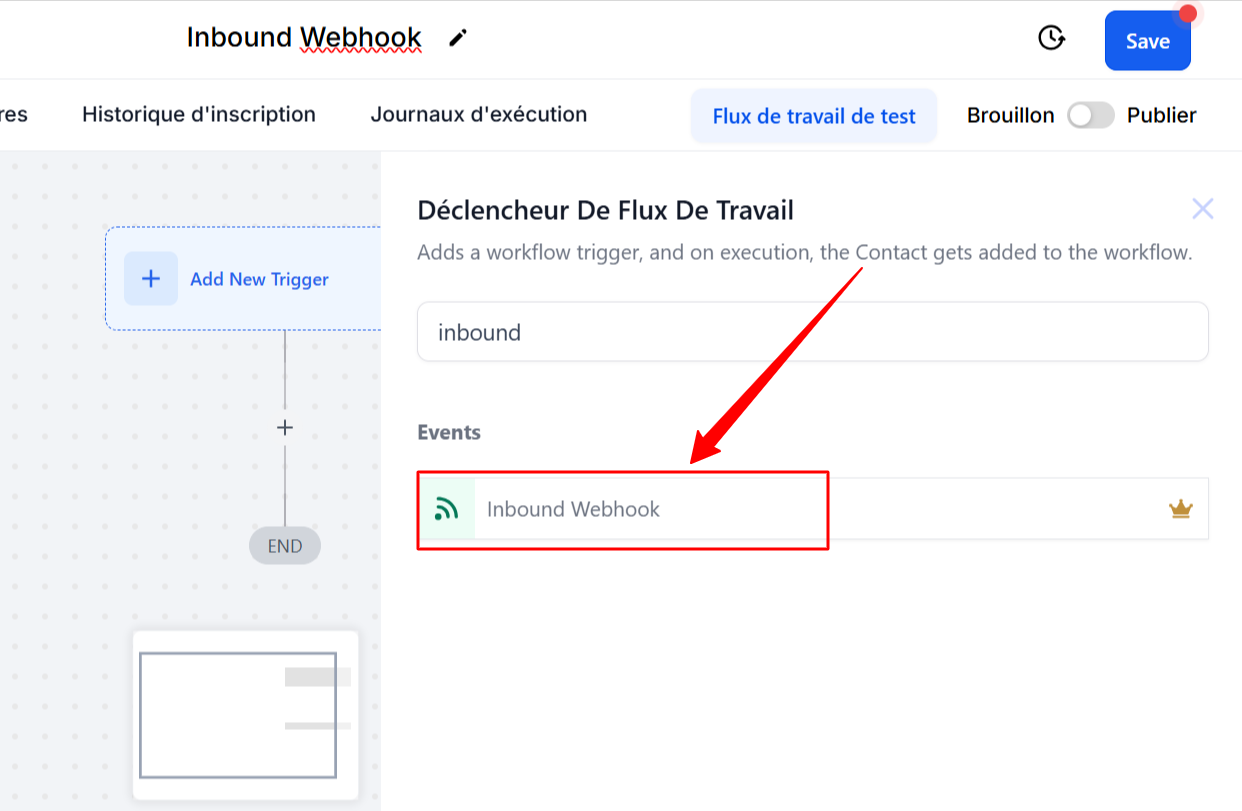
How to use the Inbound Webhook trigger
Using the Inbound Webhook trigger involves three simple steps:
1. Connect the Webhook URL in your external application
First, retrieve the special address (URL) that will serve as the "inbox" for incoming data.
Integrate this URL into a third-party application, such as Make or Zapier.
Send data to this address using the appropriate method (such as "POST").
Then click on the "Fetch Sample Requests" button in CrocoClick to verify that the integration is working correctly.
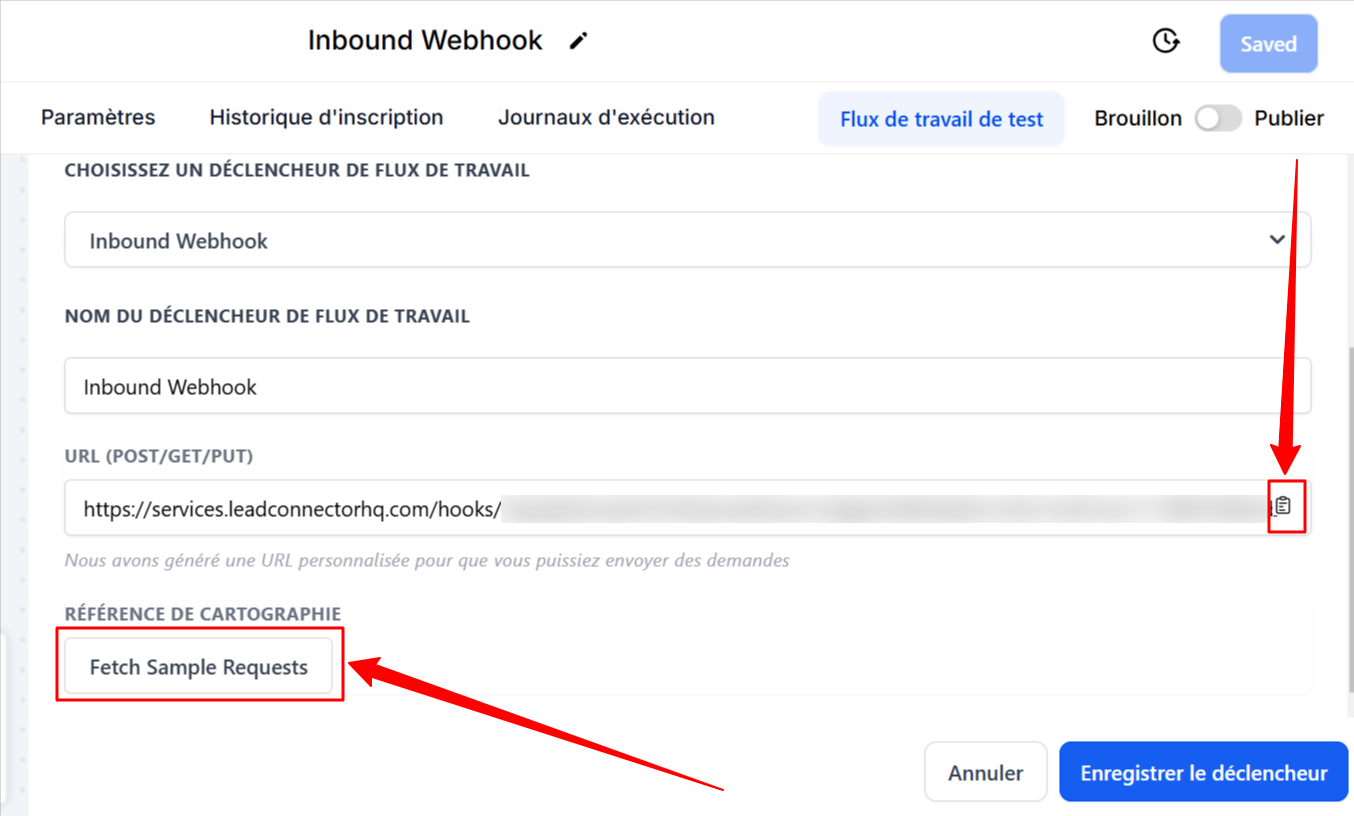
2. Choose the request to test (to easily identify the fields)
Select the test request in "Mapping Reference."

3. Map the information to CrocoClick
Use the information received in your automation actions.
For example, you can use the information received with the "create contact" action to create new contacts or update existing ones with the information received.
To do this, simply use the custom values that have been saved in Inbound Webhook Trigger > QueryParams
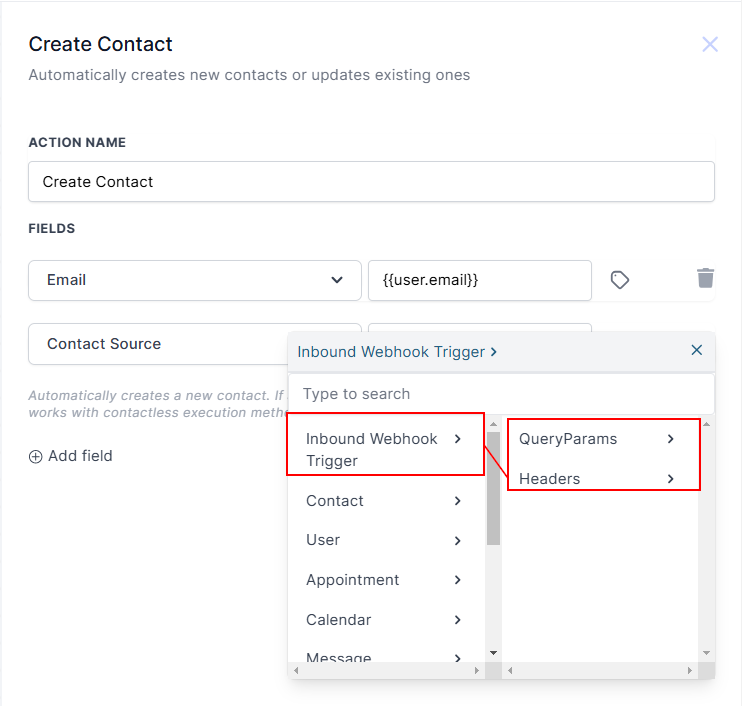
Use without contact information
The Inbound Webhook trigger works even if you don't have contact information immediately available. You can send data to trigger actions in your automation without knowing the recipient in advance. You can then add contact information if necessary.
Why are Inbound Webhooks useful?
Inbound Webhooks simplify and automate the flow of data to your CRM. Here are some practical applications:
eCommerce order integration: Automatically transfer order details from your online store to your CRM, reducing manual entry and errors.
Customer support: Send customer requests directly to your CRM for faster, more organized management.
Event registration: Easily track attendees by automatically adding their registration details to your CRM.
Lead capture: Retrieve web form submissions and send them directly to your CRM for efficient follow-up by your sales team.
Important notes
Communication method: Be sure to use JSON format with clear labels.
Essential data: Email addresses or phone numbers are essential for creating or updating contacts.
Data types: Avoid using complex data types such as lists, as they are more difficult to process.
Updates: Adjust your configuration if your data format changes.
Security: If your webhook URL is compromised, change it immediately to ensure the security of your data.
Conclusion
In summary, Inbound Webhooks offer a seamless solution for connecting your external systems, automating your tasks, and improving data accuracy in your CRM.
Whether you're managing orders, capturing leads, or tracking registrations, this feature saves you time and improves the efficiency of your workflows.