Affiliate FAQ
Find out how to manage your affiliates with this comprehensive FAQ: portal access, performance tracking, commissions, campaigns and more.
Written By CrocoTeam
Last updated 13 days ago
How do new affiliates get their unique referral link?
New affiliates can access their unique referral link in several ways:
Default email template: When you set up a campaign, you can choose an email template that includes the referral link and other essential details. This email is automatically sent to new affiliates when they join a campaign. Find out more here
Automations: Create and send personalized emails or SMS messages to affiliates using the "Affiliate enrolled in campaign" trigger.
Affiliate Portal: Affiliates can always find their referral link and other details by logging into their affiliate portal.
Can sales be tracked using promo codes?
Yes, you can create unique promo codes for your affiliates. When a customer uses one of these codes, the sale is tracked and attributed to the affiliate. This method is particularly useful on platforms where link sharing is restricted.
Can I customize the referral ID for my affiliates?
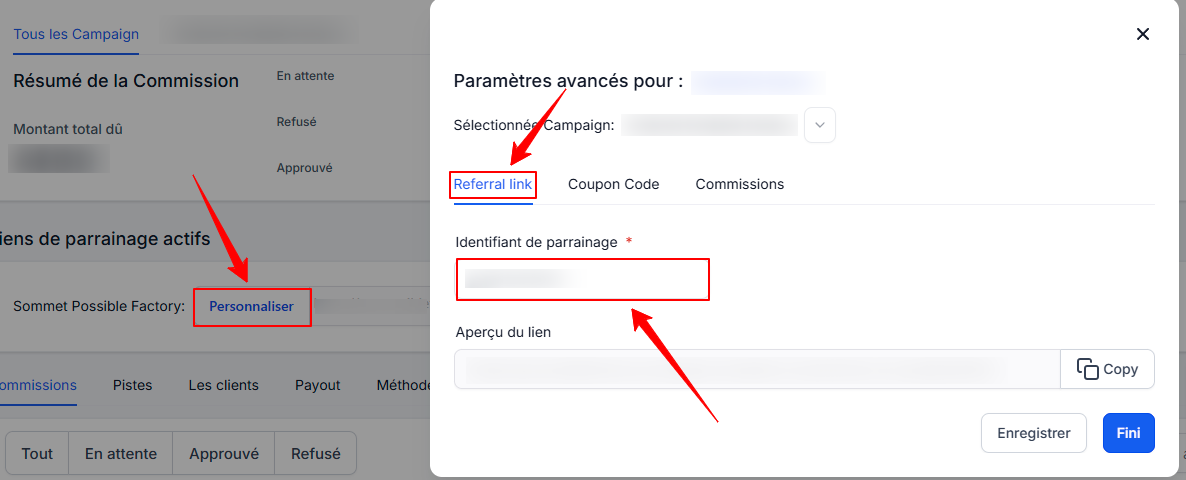
Yes, you can customize your affiliates’ referral ID (or AM ID):
Open the affiliate's profile.
Scroll down to Active Referral Links.
Click Customize next to the relevant campaign.
Edit the referral ID in the Referral Link tab.
Save the changes.
Where can affiliates view their performance statistics?
Affiliates can view their performance statistics on the Dashboard screen of the client portal. There, they can find their affiliate links, as well as the number of leads, customers, and canceled customers who used their links.
How can affiliates view their payment information?
Affiliates can access their payment information on the Commissions screen of the client portal. This section displays:
The total amount paid.
The amount owed by the administrator.
Total revenue generated.
They can also add their payment method.
Can affiliates view details about leads and customers registered through their links?
Yes, this information is available in the Leads/Customers tab of the affiliate portal.
What happens if an affiliate is part of an inactive campaign?
Even if a campaign is deactivated, affiliates can still view their statistics. However, their referral links will be inactive until the campaign is reactivated.
Can affiliates see why customers canceled?
The affiliate portal only displays the total number of canceled customers. Specific reasons for cancellations are not disclosed.
How often are affiliate statistics updated?
Statistics are updated in real time, ensuring affiliates have access to the most recent data.
How can affiliates access the client portal?
Invitation: The administrator adds an affiliate to a campaign and sends an invitation via email.
Account creation: The affiliate clicks the registration link in the email and sets up their account.
Login: Once the account is created, the affiliate can log in to access their dashboard.
Can I attribute multiple sales to different affiliates?
Yes, CrocoClick allows you to manually or automatically attribute sales to different affiliates.
Are manual sales subject to approval?
Yes, manual sales follow the same approval process as standard sales.
Can sales be attributed without the customer’s email address?
Yes. For manual sales, you can use unique identifiers or custom fields to attribute a sale to an affiliate.
With this FAQ, you have all the information you need to optimize your affiliate management in CrocoClick. If you have additional questions, feel free to consult our support team or other help articles.