Watch out for Google Translate on the CrocoClick interface
Google Translate can modify CrocoClick menus and create confusion with the CrocoBot. Find out why and how to disable automatic translation to avoid errors.
Written By Baptiste Lorreyte
Last updated 6 months ago
Why might some information from CrocoBot or the tutorials seem inconsistent?
If you use Google Translate (or another machine translation tool) directly within the CrocoClick interface, this can cause confusion.
👉 This is not a CrocoClick bug.
👉 This is not a CrocoBot error.
👉 It is a side effect of machine translation.
The real issue: Google Translate changes internal names
Google Translate doesn’t just translate explanatory text. It also translates the names of menus, tabs, and features, even though these are proper nouns in CrocoClick.
Concrete example
In CrocoClick, you have the tab:
Marketing
Google Translate might change it to:
Marketing
Result:
CrocoBot refers to it as Marketing (the actual name in the tool)
You see "Commercialization" in your interface
You look for a tab that doesn’t exist
Total confusion 😵💫
Why CrocoBot is right
CrocoBot is trained on:
The actual names of features
The exact terms used in CrocoClick
The actual structure of the interface
It doesn’t “see” the version modified by Google Translate. So
it gives you the correct instructions, but on an interface that Google Translate has distorted.
How to disable Google Translate on CrocoClick
To avoid any confusion between the names displayed in the interface and the CrocoBot’s instructions, we recommend disabling Google Translate’s automatic translation on CrocoClick.
Open CrocoClick in Google Chrome
Look to the right of the address bar
Click the 🌐 Translate icon
Click on “Never translate this site”
Reload the page
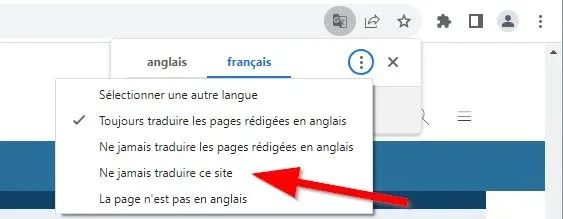
👉 CrocoClick will remain in its original version, without automatic translation.
In summary
CrocoClick uses precise and consistent names
Google Translate alters these names
CrocoBot speaks the actual language of CrocoClick
To avoid any confusion:
👉 do not translate the interface