Enter your Tax ID
Find out how to enter your Tax ID on CrocoClick, understand VAT, reverse charge and choose the right ID type for your country.
Written By Baptiste Lorreyte
Last updated 6 months ago
Why do you need to provide your tax ID number?
All CrocoClick customers worldwide must update their tax information to enable us to comply with our legal and tax obligations.
This setting directly affects:
the application of VAT
the display of taxes on your invoices
any VAT exemption you may have (reverse charge)
VAT (Value Added Tax)
If your organization is located in one of the following countries:
European Union
Norway
Turkey
United Kingdom
👉 VAT is automatically added to your purchases (CrocoClick Credits, premium options, etc.). The tax then appears on a separate line on your invoices.
VAT Exemption (Reverse Charge)
If you are a registered business, you may be exempt from VAT on your future purchases if:
you provide a valid VAT number
via: Account Settings > Billing > Payments
In this case, the reverse charge mechanism may apply.
Update your tax ID
1. Access settings
Go to Account Settings
Then Billing
Then Payments
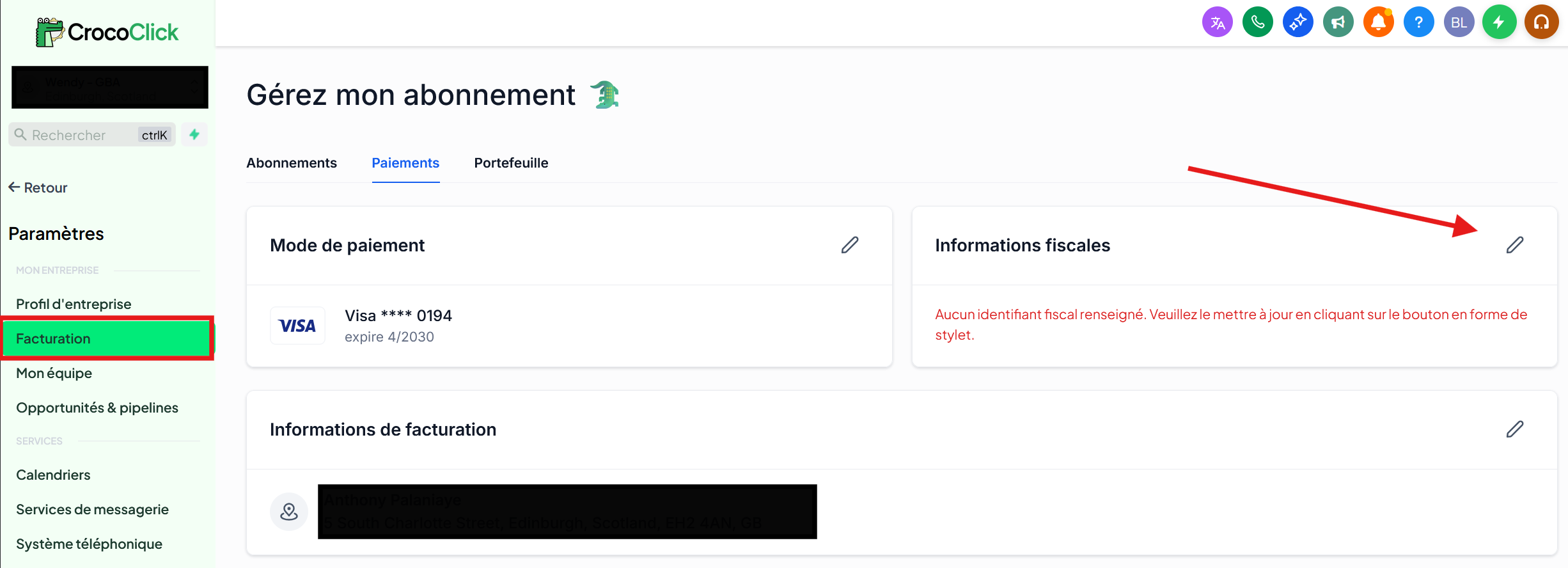
2. Changing your tax ID
Click Edit (the pencil icon)
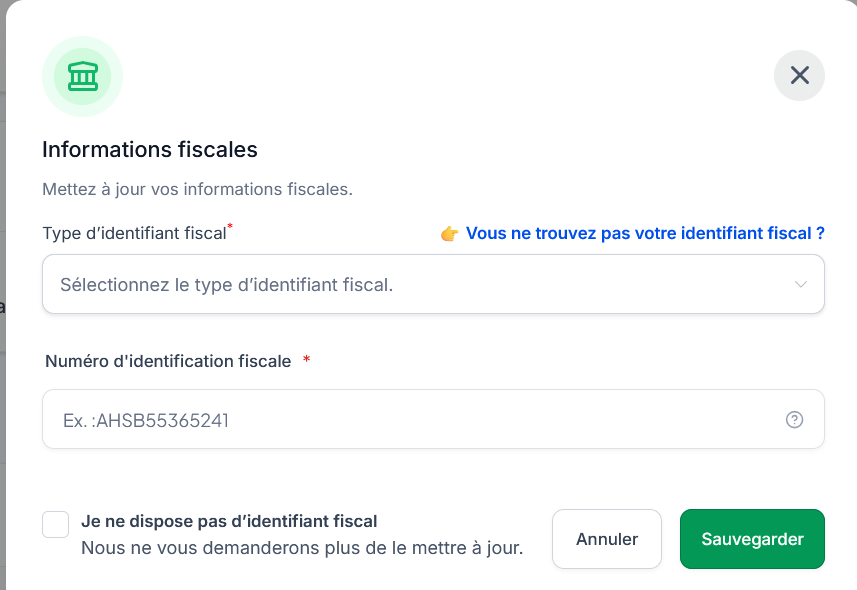
In the "Tax Information" window:
Select the tax ID type corresponding to your country/region
Enter your tax ID number
Click Save
💡Special case:
"I don't have a tax ID"
➡️ Check the box “I don’t have a tax ID” if:
you have a tax ID number not listed here
you do not have a tax ID
you do not wish to provide your tax ID
“I have multiple tax ID numbers”
If you have multiple tax ID numbers, contact CrocoClick support to determine which one to use.
Example (Canada) if you have:
ca_bnca_gst_hstca_pst_bc
👉 Support will instruct you to use ca_gst_hst, as this is the only ID that allows for full tax exemption (HST and PST).
3. Choose the correct type of tax ID
CrocoClick supports all types of tax IDs used worldwide.
The selection process consists of two steps:
Select the tax region
Enter the national tax ID number
Once the correct region is selected, CrocoClick automatically identifies the exact type of tax ID required for your country.
List of countries, tax ID types, and examples
⚠️ This list is provided for informational purposes only. Be sure to use the identifier actually registered with your tax authority.
Best Practices
Verify that your tax ID is active and valid
Use the ID associated with the entity paying for the subscription
If in doubt, contact support before confirming