Why do some e-mail addresses appear as "Invalid" in CrocoClick?
Find out why your emails are marked as invalid in CrocoClick: hard bounce, soft bounce, blacklist, full box... Understand the causes and how to reactivate a valid address.
Written By CrocoTeam
Last updated 6 months ago
In CrocoClick, when an email address is marked as "Invalid," it means the system has detected an issue preventing your messages from being sent to that address.
👉 This mechanism is in place to protect your deliverability: continuing to send emails to problematic addresses damages your sender reputation and can cause all your emails to end up in spam.
Hard Bounce vs. Soft Bounce
🔴 Hard Bounce
A Hard Bounce is a permanent rejection.
This means the email can never be delivered to that address.
Common causes:
The email address does not exist (typo, account deleted).
The sending domain you are using does not exist or does not have valid MX records (no mail server configured).
The address is blocked by a blacklist (e.g., Spamcop, Spamhaus, SORBS).
Example:
contact@gmal.comReceives a hard bounce because the email address contains a typo (gmal instead of gmail)monsier@mondomaine.comreceives a Hard Bounce due to an overly sensitive spam filter, which prevents the email from being received (not even in the spam folder)
👉 After a Hard Bounce, CrocoClick immediately marks the email as Invalid to prevent it from affecting your future campaigns.
🟠 Soft Bounce (temporary bounce)
A Soft Bounce is a temporary rejection.
The address is valid and accessible, but the recipient server is rejecting the email at that moment.
Common causes:
The recipient’s inbox is full.
The recipient’s server is temporarily unavailable or down.
Your email is too large or contains a blocked attachment.
Your domain or server is temporarily flagged as suspicious by the provider.
👉 After several consecutive soft bounces, the address may eventually be marked as invalid, as the system considers it unreachable.
The main causes of a Hard Bounce:
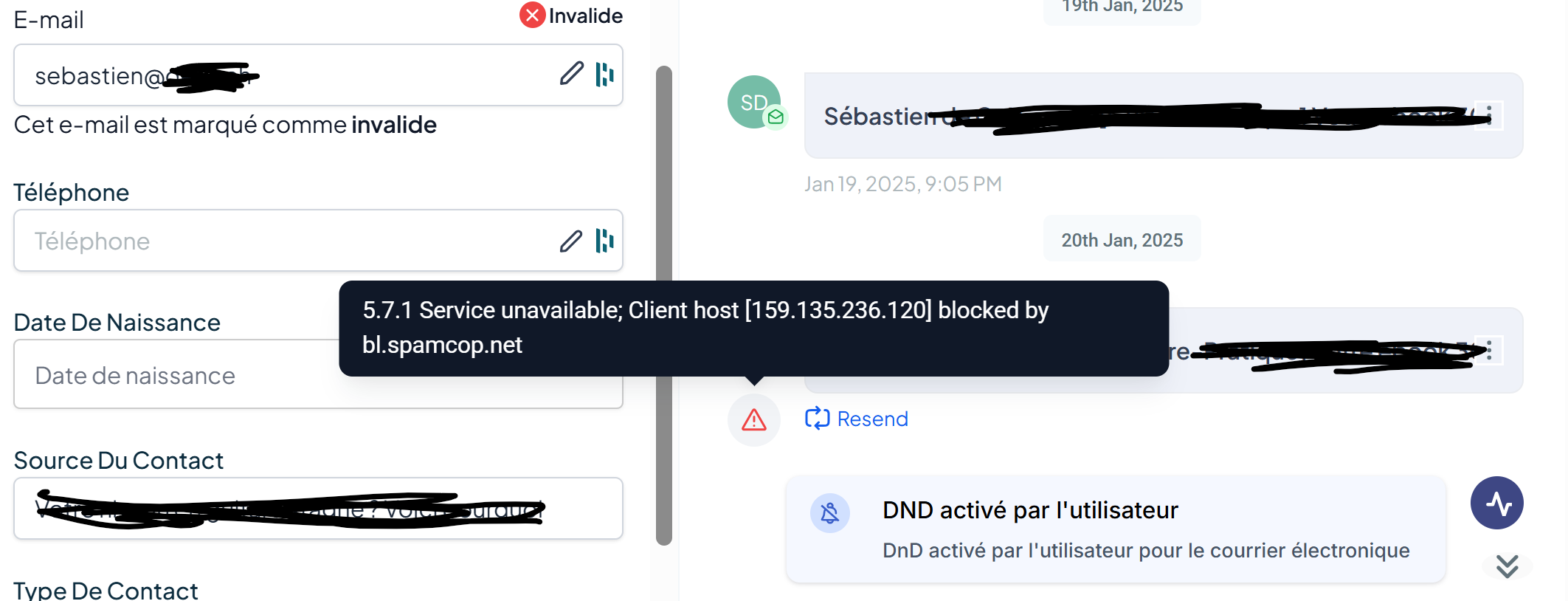
Non-existent address (typo, deleted mailbox).
Hard bounce due to blacklisting (Spamcop, Spamhaus, etc.).
Repeated soft bounces (full inbox, server unavailable).
Temporary/disposable email (addresses created for a few hours).
Anti-spam blocks or reports (recipient marking your emails as spam).
DNS/MX issue (incorrect domain configuration).
Why might a valid email address be classified as invalid?
Sometimes a fully functional address (e.g., your personal email) is marked as invalid.
This can happen if:
It has experienced a one-time hard bounce (server outage, temporary rejection).
Its domain has appeared on a blacklist (such as bl.spamcop.net).
It has accumulated too many soft bounces in a row.
Even if the address becomes functional again later, CrocoClick keeps it marked as invalid for security reasons.
What should you do if a valid address is marked as invalid?
Check the address syntax.
Test it manually (send an email from another account).
Check blacklists (e.g., via MxToolbox).
Manually reactivate it in CrocoClick if it is valid
To reactivate manually:
Go to the contact's profile
Delete the email
Save
Re-enter the email
Save