Lead tracking: hidden fields & URL parameters
Automatically track your prospects with hidden fields and URL parameters.
Written By CrocoTeam
Last updated 6 months ago
CrocoClick lets you track where your leads come from, without any complex external tools. Using hidden fields in your forms and URL parameters, you can automatically record the source, campaign, or marketing channel associated with each lead.
What is a hidden field?
A hidden field is a form field that is invisible to the visitor but can be automatically filled in if a value is present in the URL.
Simple example
URL: https://monlien.com/optin?source=instagram
Form with a hidden field named "source"
➞ The field will be automatically filled with the value "instagram" without any action required from the user.
💡 TIP: You can pre-fill multiple hidden fields in a single URL.
Complete example:
https://monlien.com/optin?source=insta&email=bob@superdomaine.com&ad_name=story1Why not just use the native "source" field?
💡 TIP: Use a hidden field like source2 to lock in the exact source from the start, even if the contact navigates elsewhere afterward.
How do I set up a hidden tracking field?
Step 1 — Add the field to the form
Open your form in CrocoClick
Add a hidden field and name it source2 (or according to your convention).
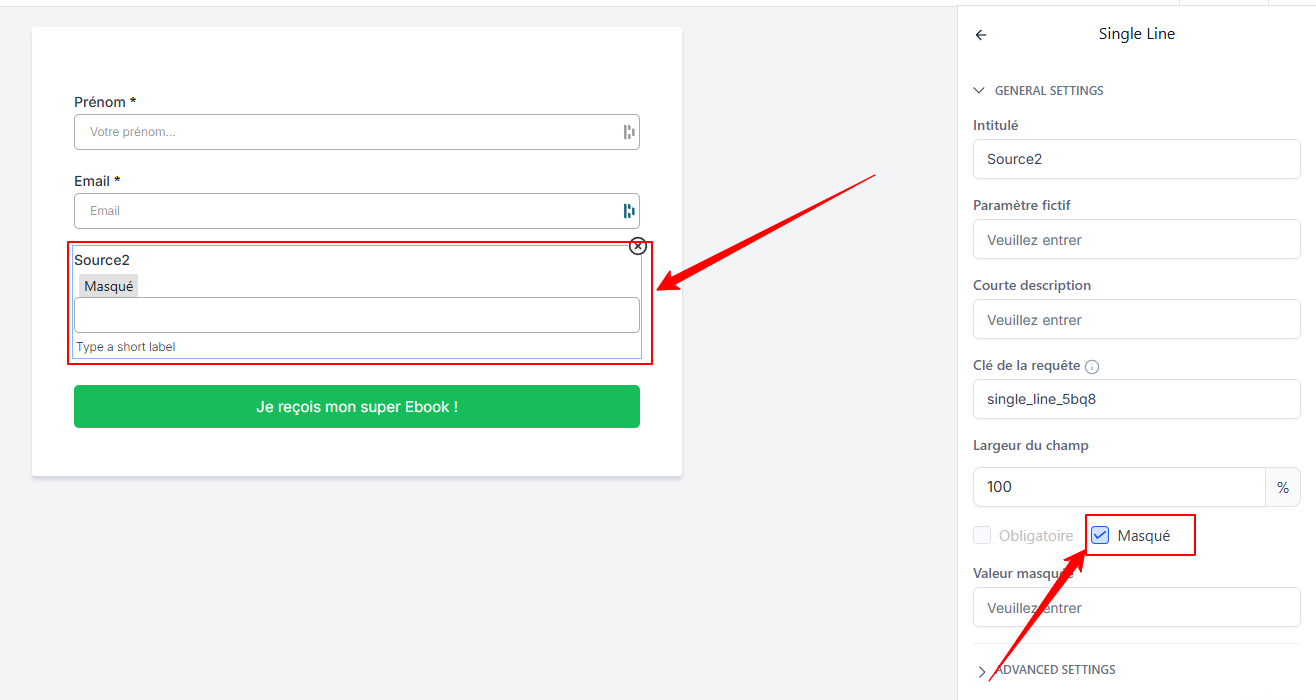
Name it
source,source2, or according to your logic (e.g.,utm_campaign,canal,ad_name, etc.).Leave the value blank
Step 2 — Create your URL with the correct parameters
Add the data to be transmitted to the end of your URL:
https://monlien.com/optin?source2=instagramTIP: No need to modify the URL; simply add ?name=yourdata to the end of the URL before sharing it
Each field in your form with the same name will be filled with the corresponding value.
💡 TIP: To combine multiple pieces of data, use "&" between the parameters:
?source2=partenariat&ad_name=reel3&landing=page_eteHow do you check if it works?
Open your test URL containing the parameters in an incognito window
Fill out the form as a prospect would
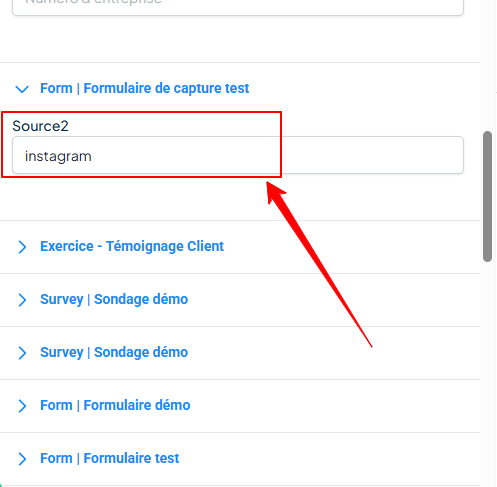
Go to Contacts > Contact Details
Check the custom fields:
source2 = instagram
Best practices
Keep names simple and consistent
We recommend not replacing the native "source" field, as it serves as a "fallback source" by automatically tracking certain parameters and UTMs
Always test your URLs before launching a campaign
Conclusion
Hidden fields + URL parameters allow you to improve the accuracy of your tracking and better understand where your leads are coming from.
It’s a simple yet extremely powerful tool for your future campaigns, analytics, and automations!