Workflow AI: Your co-pilot for business automation, powered by CrocoClick AI (100% FREE)
Create, optimize and analyze your workflows thanks to the integrated AI assistant, with tips, suggestions and step-by-step instructions... 100% free of charge
Written By CrocoTeam
Last updated 7 months ago
Workflow AI is your intelligent assistant integrated directly into the CrocoClick Workflows editor.
It guides you from start to finish: from creating a new workflow to optimizing your existing processes.
No more guessing which actions or triggers to use: simply describe what you want to automate, and Workflow AI will suggest the complete sequence, with configuration tips and suggestions for improvement.
💡TIP: Workflow AI is now included free of charge and UNLIMITED in all CrocoClick plans.
What Workflow AI can do for you
Help you create your first workflow
Simply describe your need (e.g., "send an email after a form is filled out"), and Workflow AI will tell you which triggers and actions to use, along with the configuration steps.
Make your workflows clearer
Don't understand part of your workflow? Workflow AI can analyze and explain each step in detail.
Optimize your automations
It identifies areas for improvement and suggests actions or adjustments to make your workflows more efficient.
Guide you step by step
Need assistance? Workflow AI guides you step by step through the creation or editing of your workflow.
Answer your questions
Whether you have a question about a specific action or a more general query, you can ask for help at any time.
Add actions
Example: reminder text messages, status updates, adding tags... Workflow AI can suggest and help you configure these actions.
Suggest next steps
Not sure how to proceed? The assistant will suggest relevant options to help you move forward with confidence.
💡TIP: The Workflow AI interface is currently only available in English (beta version), but the bot adapts to the language you use. So you can interact in French and CrocoBot will understand you without any problems :)
How to use Workflow AI
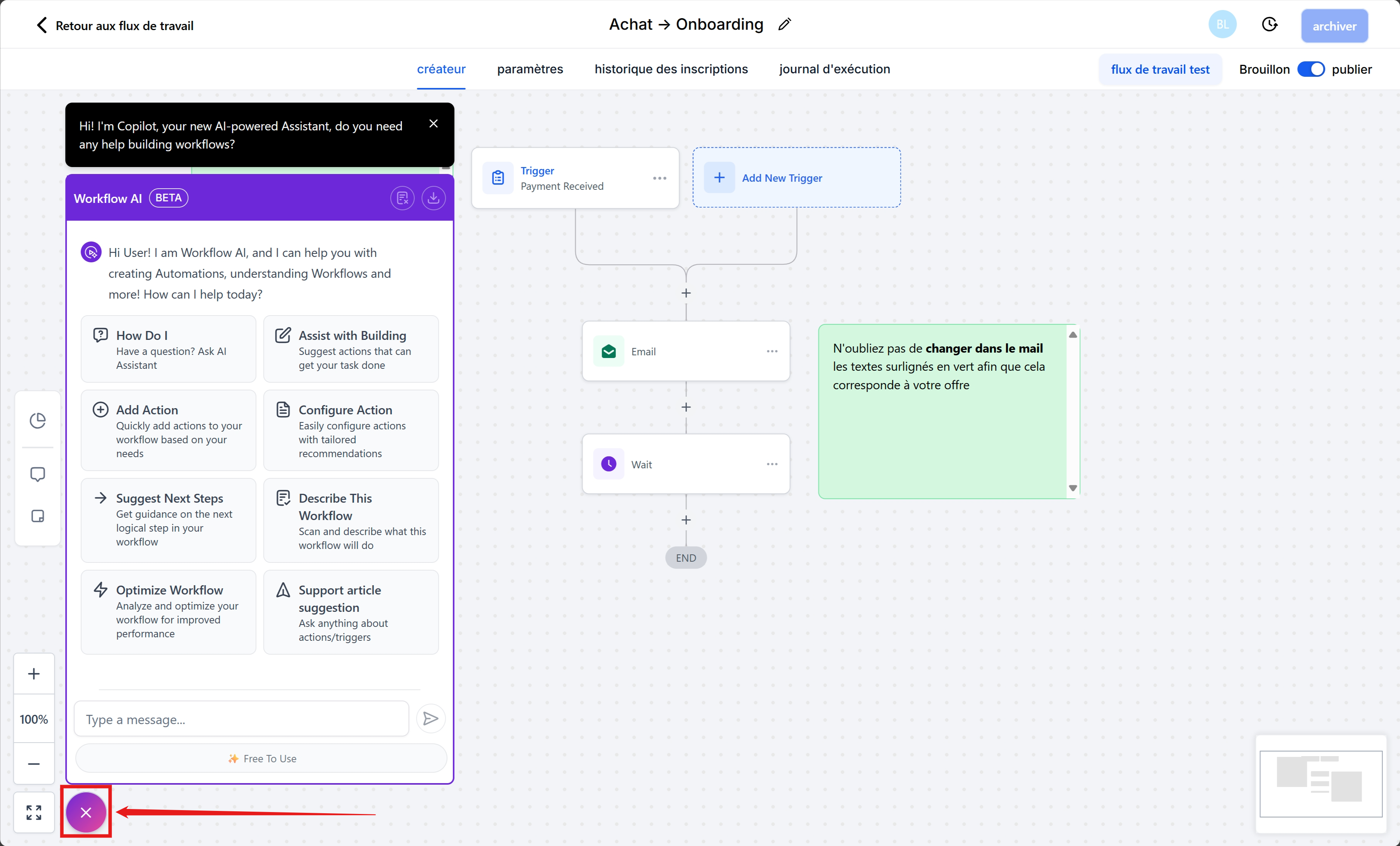
1. The Workflow AI chat
When you are in the automation editor:
The AI icon is located at the bottom left.
Click on it to open the chat window.
Three ways to interact:
Analyze an automation: Describe this workflow button.
Help with building: Create Assistance button.
Free chat: simply type your question in the dialog box.
2. Learn more about how actions & triggers work
Workflow AI isn't just a technical support tool. You can also use it as an educational guide to better understand:
What a trigger is.
What an action is.
How to nest multiple conditions.
What the best practices for automation are.
Example: ask "What is a trigger?" → Workflow AI will give you a complete explanation with concrete examples.
3. Reset a conversation
To start from scratch:
Click Clear Conversation (at the top right of the chat).
The history will disappear, and you can start a new thread.
4. Export a conversation
Need to keep a record?
Click Export Conversation.
You will receive a file containing only the current thread (previous chats are not included).
5. Analyze an entire workflow
With one click on Describe this workflow, Workflow AI generates a clear and detailed summary of your entire workflow.
This is useful for:
Recalling the logic of a workflow you had forgotten.
Training a new employee.
Explaining a process to a customer.
Documenting your automations.
Build an automation from scratch with Workflow AI
Step 1: Ask for help
Type in your use case (e.g., "I want to send a welcome email and add a tag when a contact signs up").
Step 2: Browse suggestions
Workflow AI will suggest a sequence with the right triggers and actions.
Step 3: Add to the workflow
Simply click to insert the suggested actions where you want them. The corresponding configuration will open automatically.
Step 4: Follow the instructions
Workflow AI can also help you configure actions (for example: wait until an email is opened before moving on to the next step).
Step 5: Explore the next steps
The wizard suggests additional questions to help you continue developing and improving your automation.
FAQ
Why use Workflow AI?
Because it speeds up the creation and optimization of your workflows, while reducing errors.
Is Workflow AI suitable for complex automations?
Yes. Whether it's a simple sequence or advanced automation, Workflow AI is designed to assist you.
How do I add an action?
Workflow AI will suggest it to you, and all you have to do is click on the + to add it.
Can I keep a history of my conversations?
Yes, use the Export Conversation feature to save your exchanges.
Is it available to everyone?
Yes! Workflow AI is included free of charge with all CrocoClick plans.
Workflow AI is your smart co-pilot for building, understanding, and optimizing your workflows on CrocoClick.
It saves you time, simplifies your automations, and provides you with concrete help, accessible in just one click.