Understanding dynamic variables / customs values
Customize and automate your communications with CrocoClick's dynamic variables / customs values.
Written By CrocoTeam
Last updated 8 months ago
Dynamic variables allow you to personalize and automate your communications by inserting specific information from CrocoClick. This article guides you through their different types and applications.
Dynamic variables: what are they?
Dynamic variables are placeholders that automatically insert specific data (contact name, appointment date, etc.) into your communications and workflows. They simplify personalization and automation.
Available types:
Standard variables: Predefined data such as a contact's first name or email address.
Custom values: Reusable information such as a company's contact details.
Custom objects: Complex structures for organizing advanced information.
Trigger links: Links that trigger automatic actions.
Payment links: Direct links for collecting payments.
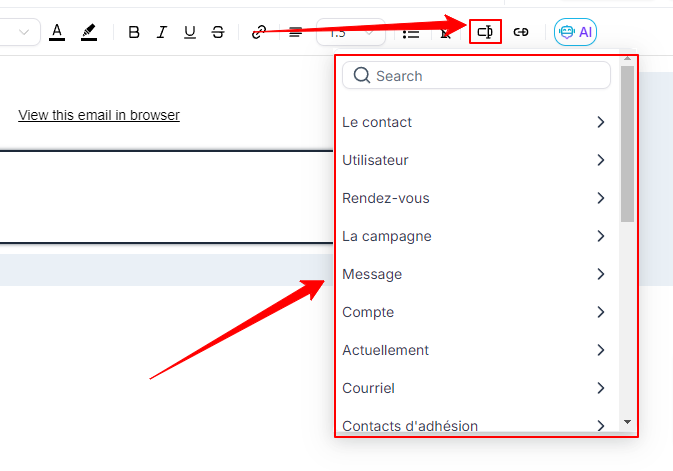
Benefits of dynamic variables
Personalization: Automatically insert specific details into your emails or text messages.
Automation: Reduce manual tasks with automated workflows.
Consistency: Maintain consistent information in your communications.
Efficiency: Save time by reusing dynamic values in your templates.
Types of dynamic variables and examples of use
1. Standard variables
These variables are built into CrocoClick by default and cannot be modified. Examples:
Contact first name: Displays the recipient's first name.
Contact email: Used for targeted campaigns.
Company name: Automatically added to communications.
2. Custom Values
These variables are ideal for inserting recurring information into your templates:
Company contact details: Phone number, email address, address.
Frequent links: Web pages or customer support.
Slogans: Signature or tagline in your emails.
3. Custom Objects
Custom objects allow you to manage advanced data.
Examples:
Subscription plans: Details of packages or renewals.
Inventory: Product management with references and quantities.
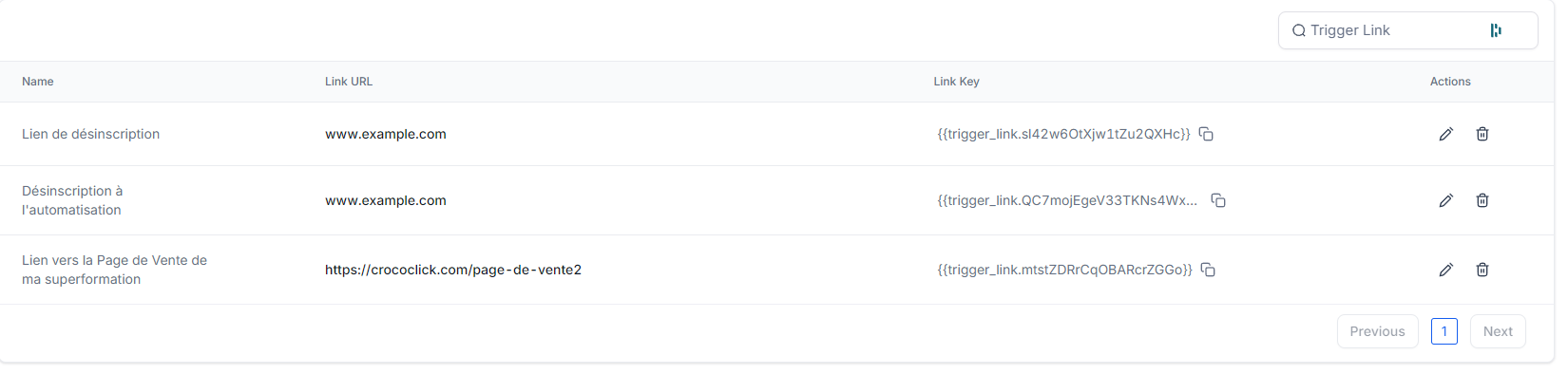
4. Trigger Links
These links trigger specific actions when clicked:
Webinar registration: Sending a confirmation email.
Event tracking: Automated reminders for participants.
5. Payment Links
Facilitate payment collection for:
Event tickets: Workshops, conferences.
Subscriptions: Recurring or one-time payments.
Donations: Fundraising for charitable campaigns.
FAQ: Your questions about dynamic variables
Q: What is the difference between Standard Variables and Custom Values? Standard
variables are integrated by default, while custom values are created for general, reusable information.
Q: Why isn't my dynamic variable displaying correctly?
Check its format and make sure the necessary data is present in the contact profile.
Q: Can I modify or delete standard variables?
No, they are built-in, but you can choose not to use them.
Q: Are dynamic variables case sensitive?
Yes, please use their exact syntax (e.g., {{contact.email}}).