Manage email preferences and mailing lists
Manage email preferences by mailing list in CrocoClick. Allow your contacts to choose their subscriptions, improve deliverability and stay compliant with email rules.
Written By Baptiste Lorreyte
Last updated 7 months ago
Email preference management allows you to manage unsubscriptions by mailing list, rather than just through a global unsubscription.
Each contact can choose which lists they remain subscribed to. CrocoClick automatically applies these choices each time an email is sent.
Result:
fewer unwanted emails,
better deliverability,
clear and lasting compliance.
What is email preference management by mailing list?
Email preference management allows each contact to define which mailing lists they wish to remain subscribed to.
Rather than a binary choice (receive everything or nothing), CrocoClick introduces a list-based approach:
Newsletter
Promotional offers
Event invitations
Product announcements
Important communications
Every email sent from CrocoClick is linked to a specific mailing list.
If a contact unsubscribes from a list, they are automatically excluded from all mailings related to that list, even if they are still in the original audience.
Why this is essential for your business
Built-in compliance
Email regulations require that contacts be able to control what they receive.
With mailing list management:
every unsubscription is explicit,
every mailing is justifiable,
the risks of non-compliance are reduced.
Improved deliverability
Sending fewer unwanted emails means:
fewer spam reports,
a better sender reputation,
more emails reaching the inbox.
Higher engagement
A contact who only subscribes to lists that interest them:
opens more,
interacts more,
unsubscribes less.
Integrated automation
CrocoClick applies preference rules before each mailing, without any manual action:
one-off campaigns,
automated mailings,
workflows.
Mailing lists and email preferences
Mailing lists are at the heart of the email preferences system.
Each list represents a clear type of communication for the contact, for example:
editorial information,
commercial offers,
events,
product updates.
Mailing lists are managed from: Settings → Preference Management
You can:
create as many lists as necessary,
change their name or description,
deactivate or delete them.
These lists serve as a single reference for all email mailings.
Associate a mailing list with an email campaign
Linking a campaign to a mailing list allows you to indicate which logical audience the email belongs to.
In concrete terms:
each email campaign is linked to a list,
CrocoClick automatically checks whether the contact is subscribed to this list,
unsubscribed contacts are excluded, even if they appear in the initial mailing list.
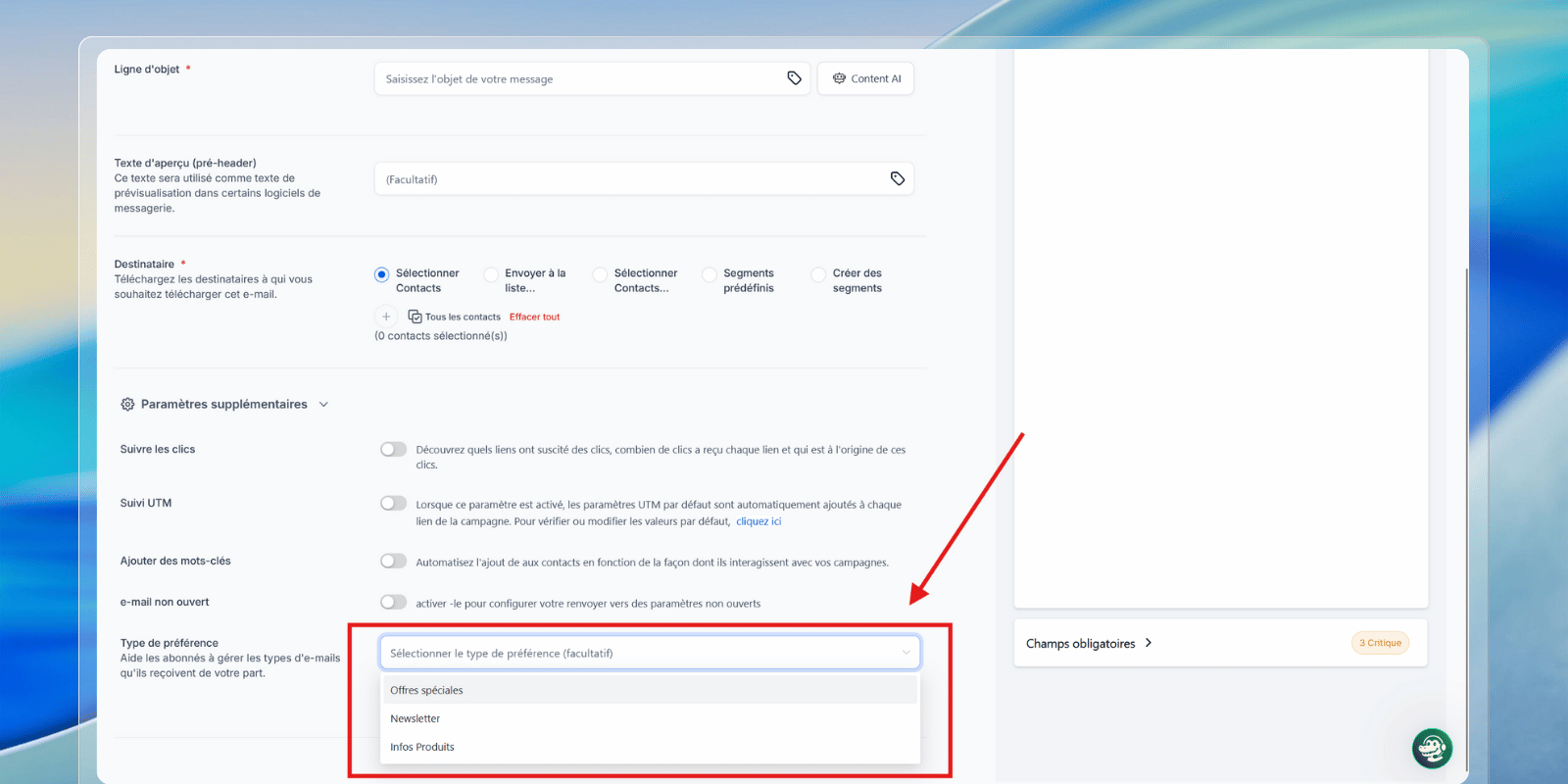
The association is made directly in the email builder, at the time of sending or scheduling.
Automatic audience filtering
Once preference management is enabled, CrocoClick automatically applies the following rules:
exclusion of unsubscribed contacts from a mailing list,
priority given to contact preferences rather than static audiences,
total consistency between consent and sending.
You build your campaigns.
The system protects your mailings.
Don't confuse: smart lists vs. mailing lists
In CrocoClick, smart lists and mailing lists serve very different purposes.
🧠 Smart lists
Smart lists are dynamic lists based on CRM filters.
They automatically group contacts according to criteria (tags, fields, statuses, behaviors).
They are used for analysis, segmentation, and targeting.
Their content is constantly changing based on contact data.
They do not manage consent.
Examples:
All leads with the Webinar tag
All contacts who have opened an email
All active customers
👉 A smart list answers the question: "
Who meets these criteria?"
📬 Mailing lists (preference management)
Mailing lists are declarative subscription lists, chosen by the contact.
They define what the contact agrees to receive.
They are linked to email campaigns.
They control partial or total unsubscriptions.
They are used for compliance and deliverability.
Examples:
Newsletter
Promotional offers
Event invitations
👉 A mailing list answers the question: "What is the contact subscribed to?"
🧩 How the two work together
In CrocoClick, you combine the "2 layers":
Smart lists are used to build the logical audience.
Mailing lists filter this audience according to the contact's preferences at the time of sending.
Even if a contact is on a smart list, they will not receive the email if they are unsubscribed from the associated mailing list.
Enable email preference management in CrocoClick
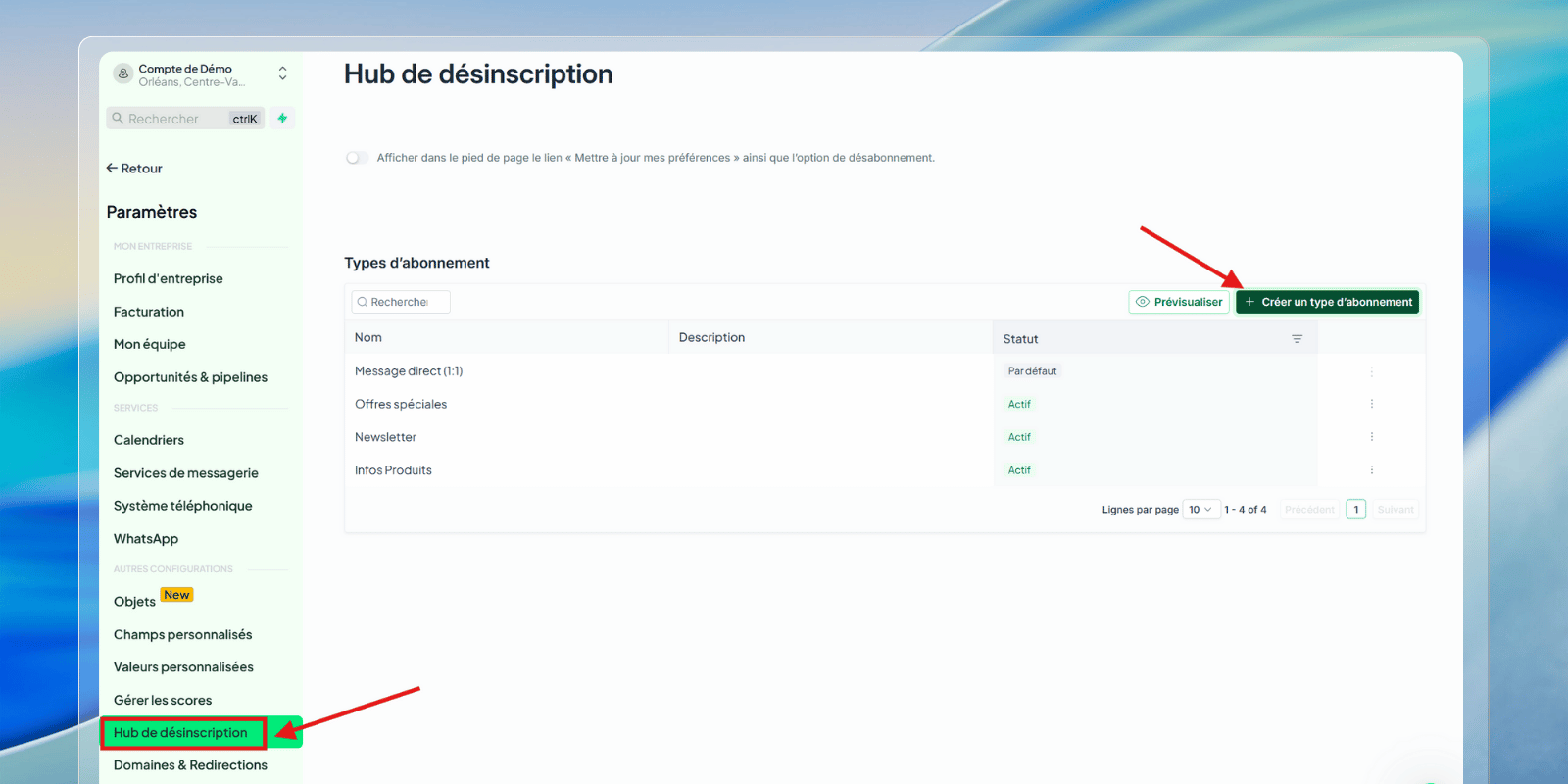
Step 1: Create mailing lists
Go to Settings → Preference Management
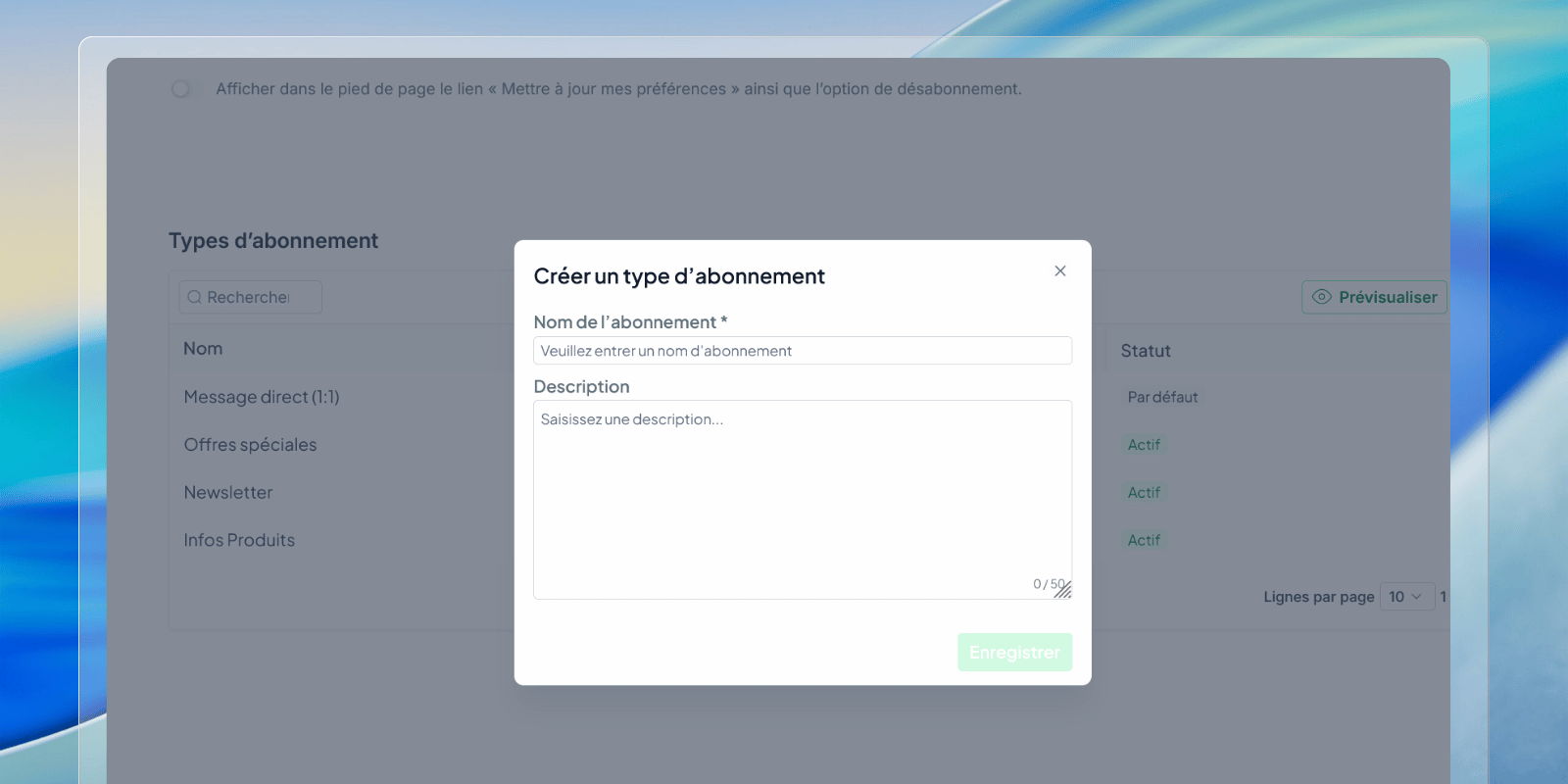
Click on Create a mailing list
Enter:
the name of the list,
a clear description for the contact
Create a list for each type of communication.
Step 2: Associate a list with a campaign
Open the relevant email campaign
Click Send or Schedule
Select the corresponding mailing list
Filtering is then automatic.
Manage a contact's preferences
Email preferences are visible and editable for each contact.
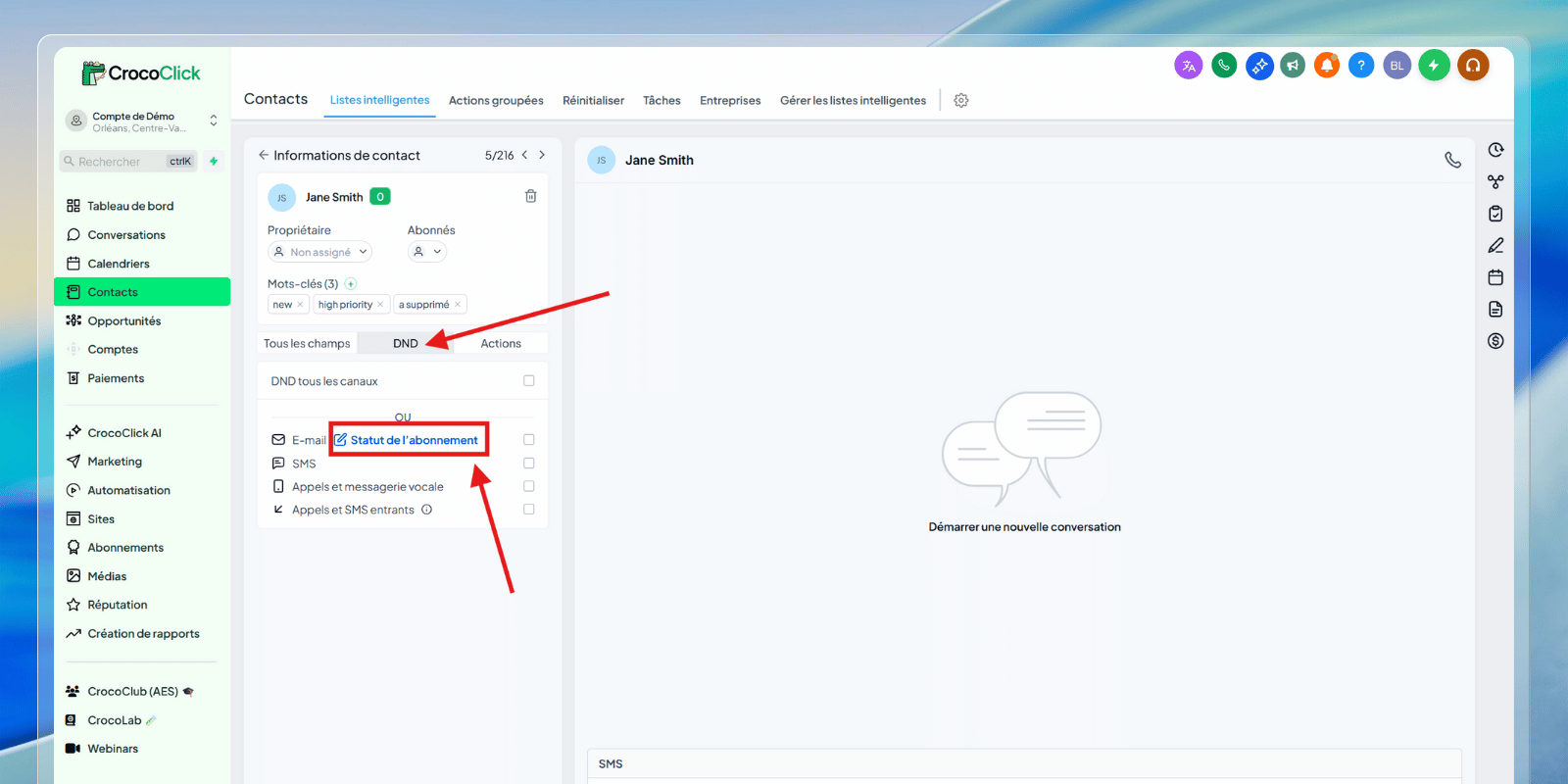
Step 1: Access the contact's preferences
Go to Contacts
Open the contact's file
DND tab
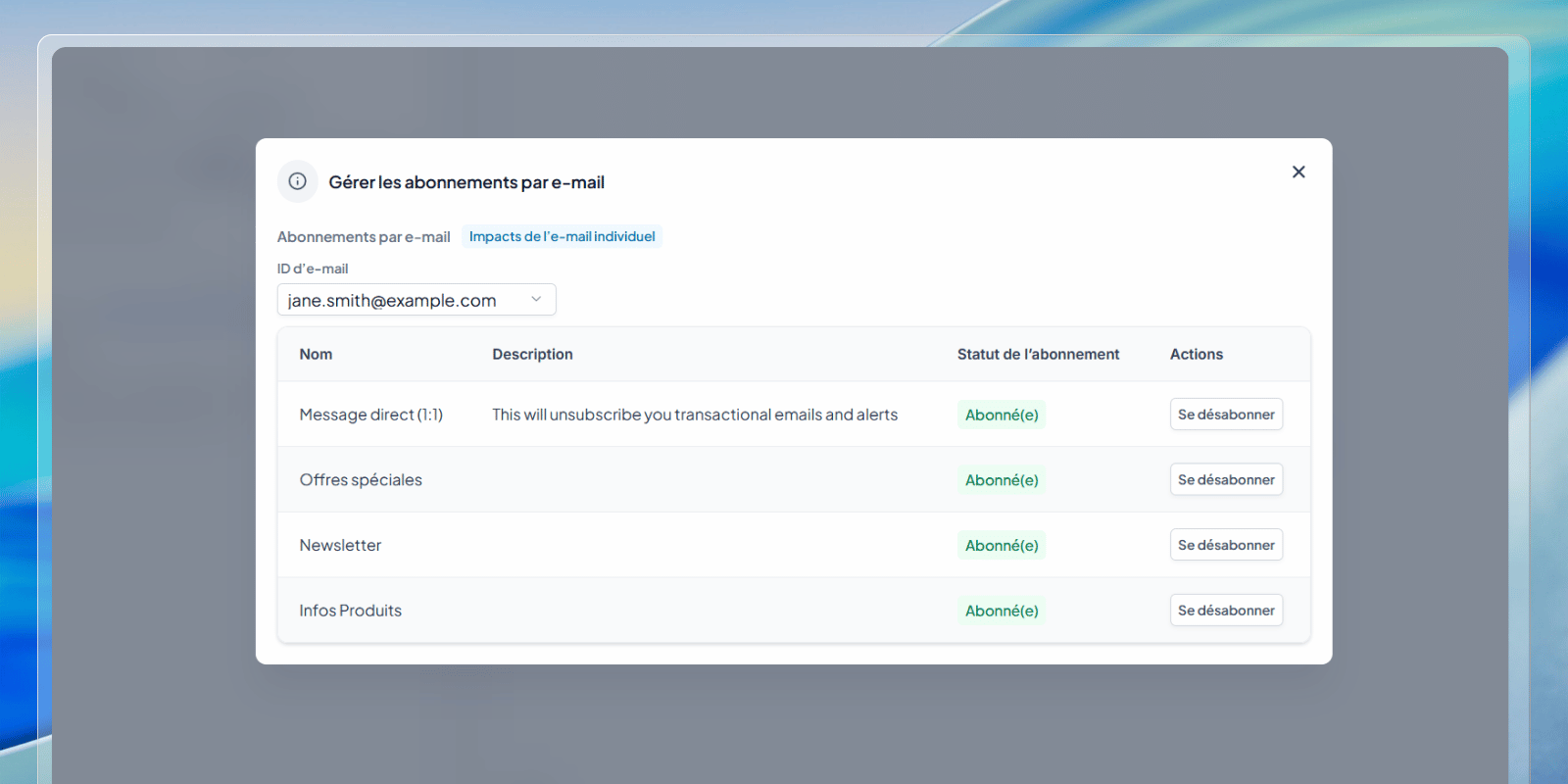
Click on Subscription Status
Step 2: Modify subscriptions
In the management window:
each list can be defined as Subscribed or Unsubscribed.
Any re-registration requires a valid legal basis.
Actions are tracked and auditable.
Frequently asked questions
Why this system is strategic in CrocoClick
Managing preferences by mailing list is not just a compliance option.
It integrates directly:
with CRM,
email campaigns,
workflows,
funnels,
the overall marketing ecosystem.
It is a clean, readable, and automated communication system that respects contacts while improving performance.