Migrate your Skool group to a CrocoClick community in 1-click
Migrate your Skool group to a CrocoClick community in just a few minutes. Automatic import of members, posts and data - simple, fast and 100% seamless.
Written By Baptiste Lorreyte
Last updated 7 months ago
This article has a simple goal: to bring your Skool community back to CrocoClick in just a few minutes, without losing any data, without any hassle, and without any complicated steps.
What is the Skool Importer?
The Skool Importer is a native CrocoClick tool that allows you to transfer:
✅ Members of your Skool group
✅ Related posts
... directly to your CrocoClick Community.
Thanks to an intelligent real-time tracking system, automatic data validation, and an ultra-simple interface, migration takes just a few clicks.
How to migrate your Skool community (quick & easy)
1) Connect your Skool group
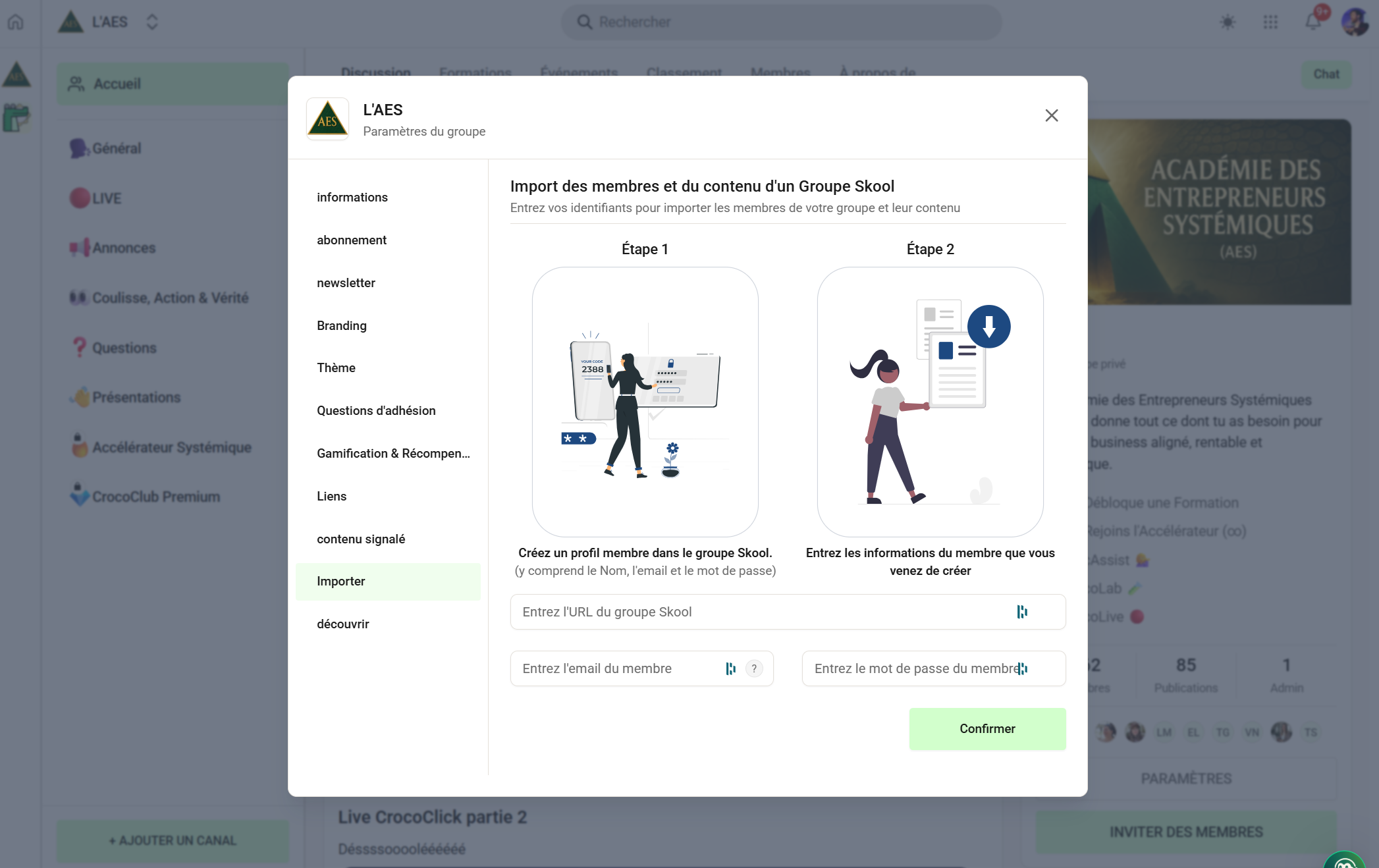
The import function works by connecting to a member's profile and "sucking" the content from the Skool group. Here's how to do it:
From your CrocoClick Community → Group Settings → Import, enter:
the Skool group URL
The email address of an admin on the Skool group
The password of an admin on the Skool group
👉 Click Confirm. CrocoClick retrieves the necessary data and prepares the import.
2) Generate & complete the member file (.CSV)
You will receive a file containing:
profileSlug
firstName
lastName
email (sometimes missing)
👉 Fill in any missing emails.
👉 Never change the profileSlug (unique identification key).
If members have joined Skool in the meantime:
→ click Refresh list to regenerate an updated file.
3) Import members into CrocoClick
Drag and drop your completed CSV file.
The system will display:
Members successfully imported
Members with errors (usually: missing or incorrect email address)
Simply correct your CSV file, then click Retry.
4) Import posts
Once the members have been imported, CrocoClick will offer to import the posts.
Progress is displayed in real time:
"10 posts imported — 3%"
Posts are automatically linked to the correct members (Only imported members can see their migrated posts.)
🚀 Why is this powerful?
Ultra-simple 4-step process
Editable CSV to correct information without starting from scratch
Progress bars & instant feedback
Complete migration: members + posts
Links between authors and publications preserved
Migration in just a few minutes
CrocoClick does most of the work, and you get your community back ready to use.
💡 CrocoClick tips
Always refresh before downloading the CSV if your Skool group is active.
90% of errors are due to missing or incorrect emails.
Posts can only be migrated after members.
❓ FAQ
Can I re-import members with errors?
➡️ Yes, edit the CSV and click Retry.
Can I modify the profileSlug?
➡️ No. This breaks the Skool → CrocoClick link.
Are posts imported for a non-imported member?
➡️ No. Posts follow members.