Premium action in CrocoClick automations (crown)
CrocoClick premium shares: definition, real cost per unit, difference with Workflow Pro packages and how to reduce the price per share by up to -94%.
Written By Baptiste Lorreyte
Last updated 7 months ago
When you start to seriously automate with CrocoClick, one question always comes up:
"Why do some advanced actions have a crown and consume my free credit... and others don't?"
The answer is simple: anything that consumes a resource outside of CrocoClick has a cost. And CrocoClick has chosen to make this cost clear, predictable, and controllable.
What is a premium action in CrocoClick?
A premium action is an action executed by a workflow that has an external execution cost.
In other words:
data is transmitted to another system,
an external integration is triggered,
an advanced action is executed.
👉 At that point, a premium action is consumed.
EXAMPLES:
Send data to Google Sheets
Trigger a webhook
Send a Slack notification
Call an AI action
Conversely, everything related to internal logic is free:
conditions,
delays,
if/else branches,
workflow organization.
These steps structure the system, but do not consume any external resources.
👉 In the CrocoClick interface, any action marked with a "crown" icon is a premium action.
How much do premium actions cost in CrocoClick?
In CrocoClick, there are two simple and complementary ways to use premium actions. The choice depends mainly on your automation volume.
1. Individually, without a subscription
This is the easiest way to get started.
Each CrocoClick account has 100 free premium actions for life
Once this quota has been used up, each premium action is billed at $0.025 per execution
👉 This mode works without any additional subscription.
👉 Workflows continue to run normally, without limits or blockages.
This is a good option for:
Testing premium actions
Occasional automation
Or running a very low-volume system
2. Via a CrocoClick Workflow Pro plan
When integration with external software becomes a real pillar of your system, CrocoClick offers a second approach: Workflow Pro plans.
Instead of paying for each action individually:
You purchase a monthly volume of premium actions included
With a much lower cost per action
And more predictable billing
👉 The more you automate, the more advantageous this mode becomes.
👉 Excess actions are still possible and are simply billed at the package rate (i.e., much cheaper)
Where can I find Workflow Pro plans in CrocoClick?
Workflow Pro plans are accessible directly from the CrocoClick interface, without having to dig through global billing settings.
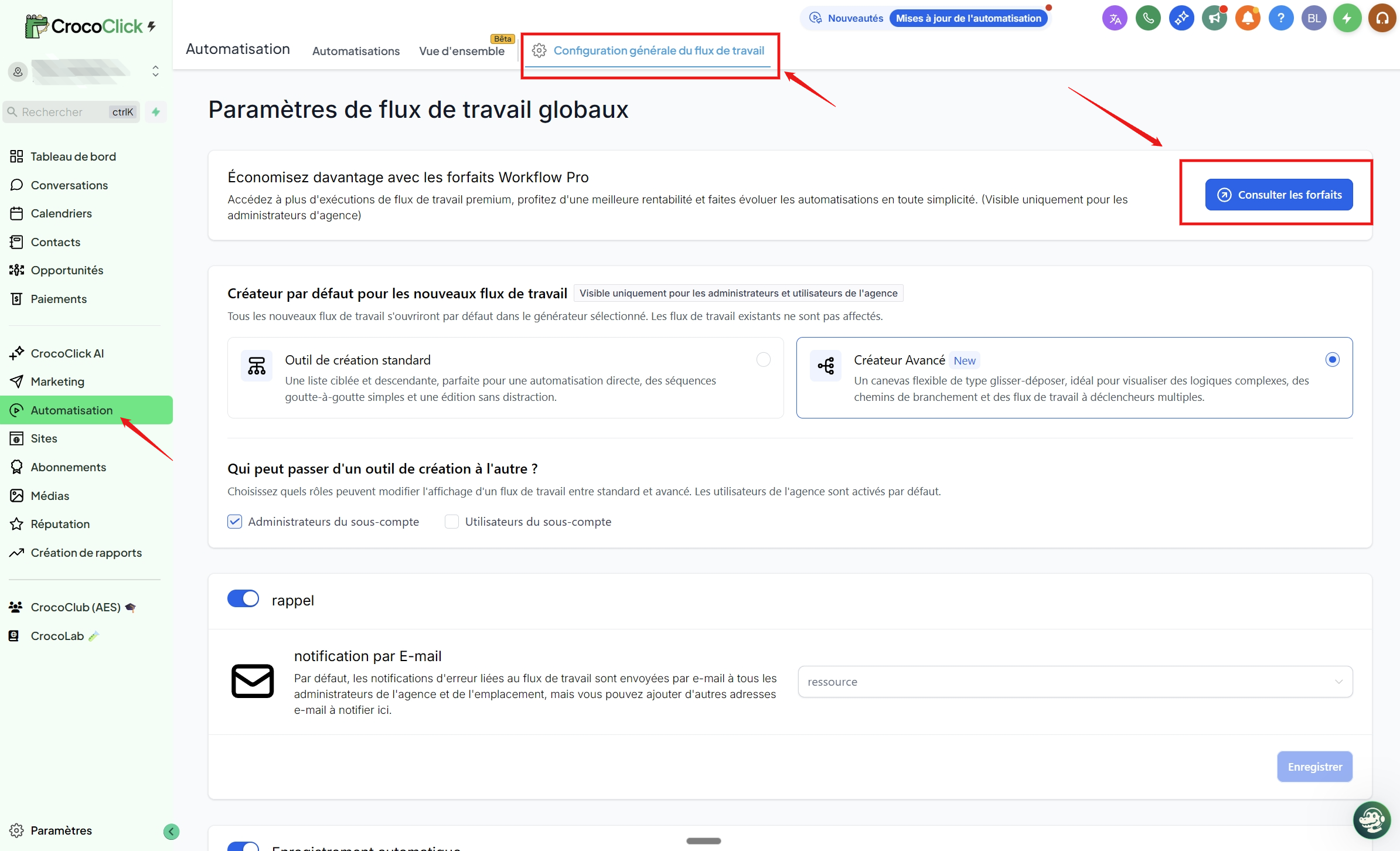
Open the Automation menu in the left sidebar
Click on General Workflow Configuration
At the top of the page, click on the View Packages button
From this screen, you can:
View the different Workflow Pro plans
See the number of actions included
Change plans at any time
Why this model is consistent with CrocoClick
CrocoClick was not designed to "keep things simple at all costs." It was designed to stand the test of time, scale cleanly, and not crash as soon as you seriously automate connections with external software.
This model allows you to:
Keep a stable tool
Not penalizing users who centralize everything in CrocoClick
Advanced users to exploit the full power of the system
No hidden costs
In summary
One premium action (with crown) = one external, paid execution in a workflow
The Workflow Pro Plan is used to centralize and optimize these costs
Free: $0.025 per action after 100 free actions
Paid plans significantly reduce the unit cost (up to 94% off)
Any action with a crown consumes a premium action