Creating an effective AI prompt in CrocoClick: our top tips
Learn how to create effective AI prompts in CrocoClick with our tips, real-life examples and best practices.
Written By CrocoTeam
Last updated 7 months ago
A good prompt is like a good briefing to an employee:
If you are vague, you get a vague response.
If you are clear, precise, and contextual, CrocoClick's AI becomes a tailor-made assistant that produces exactly what you need.
In this article, we'll look at how to write prompts that transform your AI and CrocoBot AI automations into results machines, whether it's writing an email, qualifying a lead, or analyzing a customer message.
1. Understanding what a "prompt" is
A prompt is the instruction you give to the AI.
In CrocoClick, the prompt can contain:
Contextual information (the role of AI, your objective)
Dynamic data (custom variables such as
{{contact.first_name}})
Vague example:
Rédige un emailEffective example:
Tu es un conseiller commercial expert en {{form.projet}}. Rédige un email chaleureux mais professionnel à {{contact.first_name}}, qui a un budget de {{form.budget}}, pour lui proposer un rendez-vous téléphonique.2. The four pillars of an effective prompt
1️⃣ Give AI a role
The more specific you are, the more the AI will adopt the tone and style you want.
Tu es un copywriter spécialisé en marketing B2B.Tu es un coach sportif motivant qui parle à des débutants.2️⃣ Provide context
AI needs to understand who it is addressing and in what situation.
Le contact {{contact.first_name}} a téléchargé notre ebook sur la nutrition. Il cherche à perdre du poids rapidement et a indiqué un objectif de {{kilo_a_perdre_}}.3️⃣ Give clear instructions
Avoid vagueness. Say what you want specifically, not what you "hope" for.
Example "prayer":
Ecris un BON mail au prospect
Effective example:
Écris un email de 100 mots maximum, structuré en 3 parties : accroche, valeur, appel à l’action.4️⃣ Specify the expected format
Ask for exactly the structure you want.
Format : 1. Accroche 2. Corps du message 3. SignatureNe donne QUE le contenu du mail. Pas de commentaire avant ou après, je veux le texte brut et rien d'autre dans ta réponse.3. Use dynamic variables in your prompts
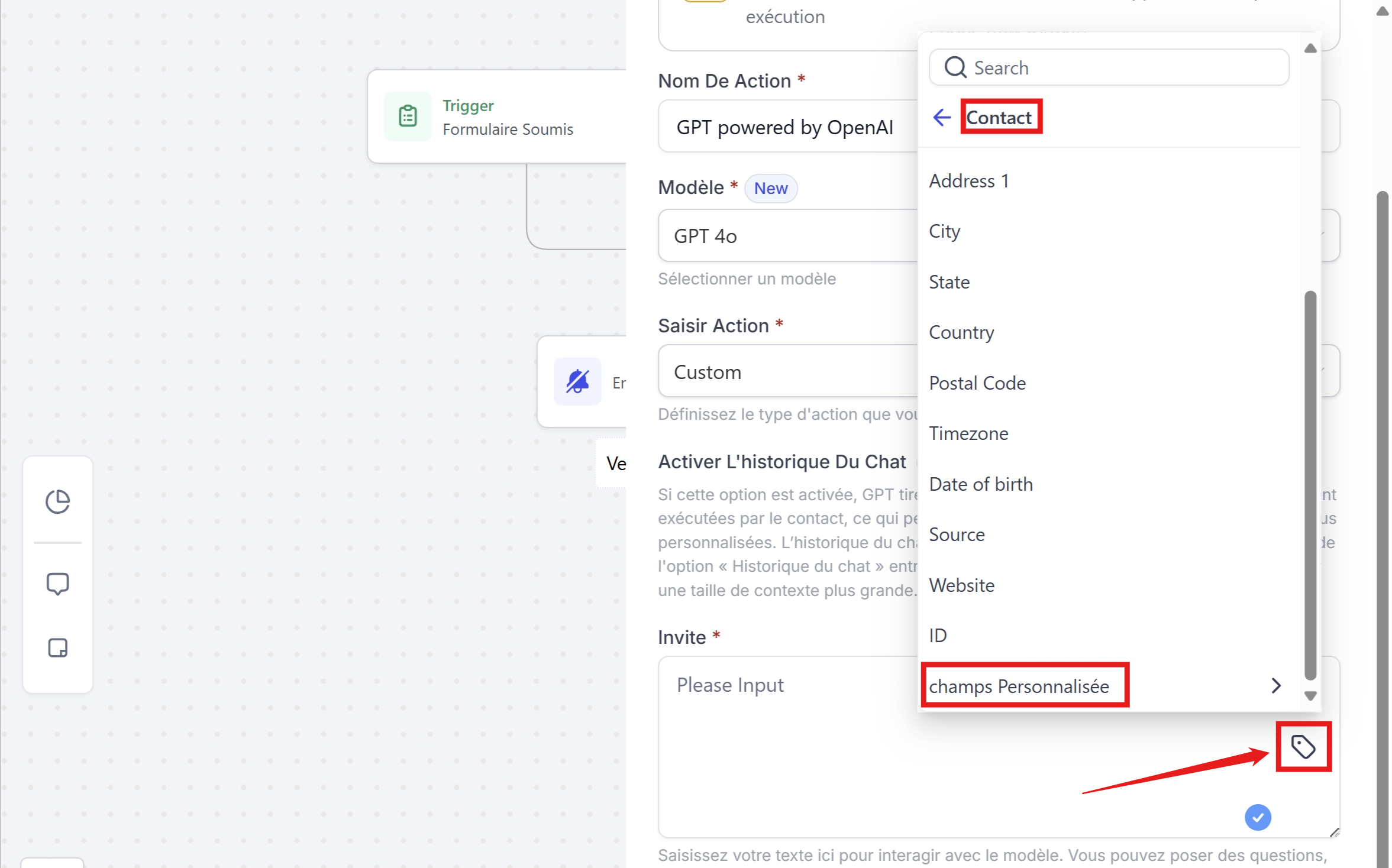
Custom variables allow you to automatically insert data from your CRM into the prompt.
Some useful variables:
{{contact.first_name}}→ Contact's first name{{contact.company}}→ Company{{contact.phone}}→ Phone number{{message.body}}→ Message received (if the trigger is "customer reply"){{appointment.start_time}}→ Date and time of appointment (if the trigger is "appointment scheduled")
Example:
Tu es un expert en Nutrition. Rédige le texte d'un SMS à {{contact.first_name}} pour confirmer son rendez-vous le {{appointment.date}}, en ajoutant un conseil pratique pour bien se préparer sachant que l'objectif du rdv pour le prospect est {{objectif_rdv}}

Ne donne QUE le contenu du SMS, sans aucun commentaire avant ou après. Juste le texte brut.

 Ton ton est pro et amical. Tu tutoie la personne.
4. Adjust the temperature
The temperature—found in the advanced options—controls the creativity of the AI:
0.1–0.3: Accurate, factual, consistent responses
0.4–0.6: Balance between accuracy and creativity
0.7–0.9: Creative responses, freer tone
Tip:
For a serious email → 0.2
For a fun and friendly WhatsApp message → 0.8
5. Mistakes to avoid
❌ Being too vague (“Write me a text”)
❌ Forgetting the customer context
❌ Not testing with real data
❌ Asking for several contradictory things in a single prompt
6. Checklist before validating your prompt
Have I given the AI a clear role?
Have I included the necessary data via variables?
Have I specified the output format?
Have I chosen the right temperature?
Have I tested with a real contact?
Conclusion
A good prompt in CrocoClick is a combination of:
Precise instructions
Rich context
Dynamic data
An expected format
It's this combination that transforms your AI actions into super assistants capable of generating content, qualifying leads, and responding to your customers as if it were you.
And remember: a prompt always improves with testing.
The more you refine it, the more relevant and impactful your results will be.