How to use AI Actions in your CrocoClick automations - and multiply their power tenfold with custom variables
Discover how to use AI Actions in CrocoClick to create intelligent, personalized and powerful automations.
Written By CrocoTeam
Last updated 7 months ago
Imagine:
A prospect fills out a form on your website.
A second later, CrocoClick reads their answers, gauges their level of interest, drafts a personalized email that mentions their company, project, and budget... and sends it to them automatically.
Not a generic message.
An email written for them, at that precise moment, in their tone.
That's the power of AI Actions in CrocoClick.
Your workflows switch from "mechanical" to "intelligent" mode, capable of analyzing, adapting, and personalizing each interaction.
What is an AI Action in CrocoClick?
An AI Action is an action that you insert into your CrocoClick automations.
It receives data (form, message, CRM profile, etc.), analyzes it with CrocoBot AI (powered by the GPT model of your choice), and produces a result tailored to your context: text, score, analysis, translation, etc.
You then decide what to do with this result:
Send it (email, SMS, chat)
Use it to qualify a lead
Use it to enrich a contact record
Integrate it into another tool or workflow step
Concrete use cases (with ready-to-use prompts)
1. The ultra-personalized follow-up email
Trigger: "Request a quote" form completed.
Variables received: {{contact.first_name}}, {{form.projet}}, {{form.budget}}
AI prompt:
Tu es un conseiller commercial expert dans {{form.projet}}. Rédige un email personnalisé à {{contact.first_name}}, qui a un budget de {{form.budget}}, pour lui proposer un rendez-vous téléphonique. Adopte un ton chaleureux mais professionnel.

Ne me donne comme output QUE le mail. Pas de commentaires avant ou après le mail.
Result: A unique email for each prospect, tailored to their responses.
2. Automatic qualification and scoring
Trigger: Form submission or first message received.
AI prompt:
Analyse les infos suivantes : Entreprise : {{contact.company}} Secteur : {{contact.industry}} Message : {{message.body}}

Puis donne Un score d'intérêt sur 100 pour mon entreprise [DETAILLER VOTRE ENTREPRISE]

Je ne veux que le score. Ne réponds que avec le nombre, et rien d'autres
Result: An immediately usable score to prioritize your leads.
Then simply add an action to save the GPT response in a custom field, and it will be available in your CRM.
3. Intelligent 24/7 response
Trigger: New message received via chat or email.
AI prompt:
Réponds au message suivant en te basant sur nos offres : {{message.body}} Le but est : - De répondre précisément à la question - De proposer un appel à l'action vers la page {{custom.link}} Adopte un ton amical et professionnel.

Pour contexte, voici le détail de nos offres : [DETAILLEZ VOS OFFRES]
Result: A relevant, personalized, and immediate response, even outside of business hours.
Simply add a "send an email" action and use the AI response.
💡TIP: For this type of use, we recommend using CrocoBot rather than automations.
CrocoBots give you many more customization options and you can "feed" the AI with your data beforehand.
In addition, CrocoBots have a "suggestion" mode that allows you to submit responses for validation before sending.
4. Personalized abandoned cart follow-up
Trigger: Opt-in order form completed.
AI prompt:
Rédige un email à {{contact.first_name}} pour lui rappeler qu'il a laissé {{product.name}} dans son panier. Utilise un ton engageant et propose un code promo de 10%. Le code promo est "XJ10V6"
Then simply add a "send an email" action and use the AI's response.
💡TIP: For a full explanation, we recommend reading our article on "how to create an abandoned cart sequence" (COMING SOON)
5. Customer satisfaction analysis
Trigger: "Feedback" form completed.
AI prompt:
Analyse le message suivant : {{form.feedback}}

Et Donne :
- Sentiment global (positif, neutre, négatif)
- 2 suggestions d'amélioration
Don't forget to add an action to save the response in a field or have the response sent to you by email.
The magic of custom variables
As you can see, what makes AI Actions so powerful with CrocoClick are dynamic variables.
They allow the AI to work on your real data.
Here are a few examples:
{{contact.first_name}}→ Contact's first name{{contact.company}}→ Company name{{message.body}}→ Content of the message received{{appointment.date}}→ Appointment date
You can insert these variables into your prompts so that the AI adapts each response to the specific context of the customer.
And of course, your custom fields work too. Combining AI actions with form filling is often a powerful combination.
Practical guide — Setting up an AI Action
Step 1: Create the workflow
Go to Automations > Workflows
Click + Create a workflow
Choose a trigger (e.g., Form submitted)
Give your workflow a clear name
Step 2: Add the AI Action
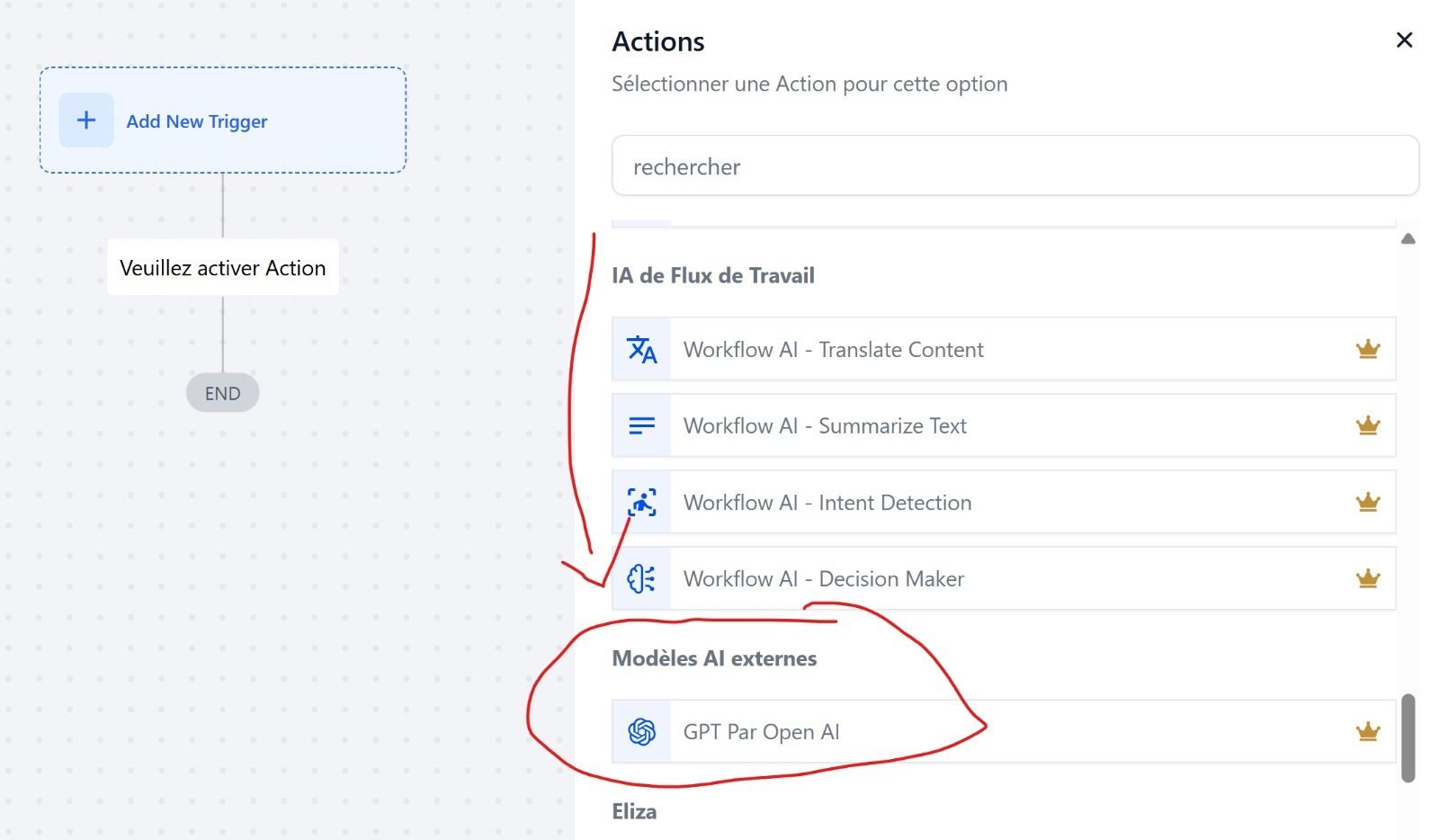
In the workflow, click + Add Action
Search for "GPT by OpenAI"
Select the model (GPT-5 for optimal results, GPT-5-mini for cost and efficiency, GPT-5-nanon for the simplest prompts)
Step 3: Write the prompt
Choose "Custom" to create your own prompt, or start with one of our pre-configured prompts
Define the role of the AI (e.g., "You are a sales assistant...")
Clearly state the task (e.g., "Write an email...")
Incorporate dynamic variables (e.g., "
{{contact.first_name}}")Specify the output format (e.g., "Format: SCORE: X/100," "only provide the content of the email without comments," etc.)
Step 4: Add other actions, including an "output" action
Add an output action, such as "edit the contact field" or "send an email."
You can also chain several AI actions together to save them in different fields (action 1: "create a score"; action 2: "create email content")
Step 5: Test and adjust
Use real examples to check consistency
Adjust the temperature:
0.1 → precise and concise / follows instructions to the letter
0.9 → more creative and varied / may deviate from the imposed framework
Best practices for effective prompts
Clear context: Who is speaking and to whom
Precise instructions: No room for unnecessary interpretation
Expected format: Tables, bullet points, paragraphs, etc.
Rich data: The more relevant information the prompt contains, the better the result
Conclusion
CrocoClick's AI Actions transform your workflows into intelligent systems.
They don't just execute instructions: they understand, adapt, and personalize.
Start small: a personalized follow-up email, automated qualification. Then gradually roll out AI across all your touchpoints.
With CrocoClick, your automations are no longer static. They become dynamic, contextual, and incredibly effective.