Solve the problem of missing training courses in customer portal previews
If you can't see all your training courses in preview, here's a simple solution for displaying the customer portal in admin mode
Written By CrocoTeam
Last updated 7 months ago
You clicked on "Preview the customer portal"... but not all your training courses are showing up?
Don't panic: it's not a bug, just a minor access issue.
🧠 Why can't I see all my courses when I preview as an administrator?
When you click on "Preview," CrocoClick attempts to display the portal as a logged-in user would see it.
However, if you recently accessed your portal as a student (or if your browser has remembered a previous session), you are still logged in with a "user" role.
As a result, you will only see the courses assigned to that user account, not the full admin view.
✅ The simple solution
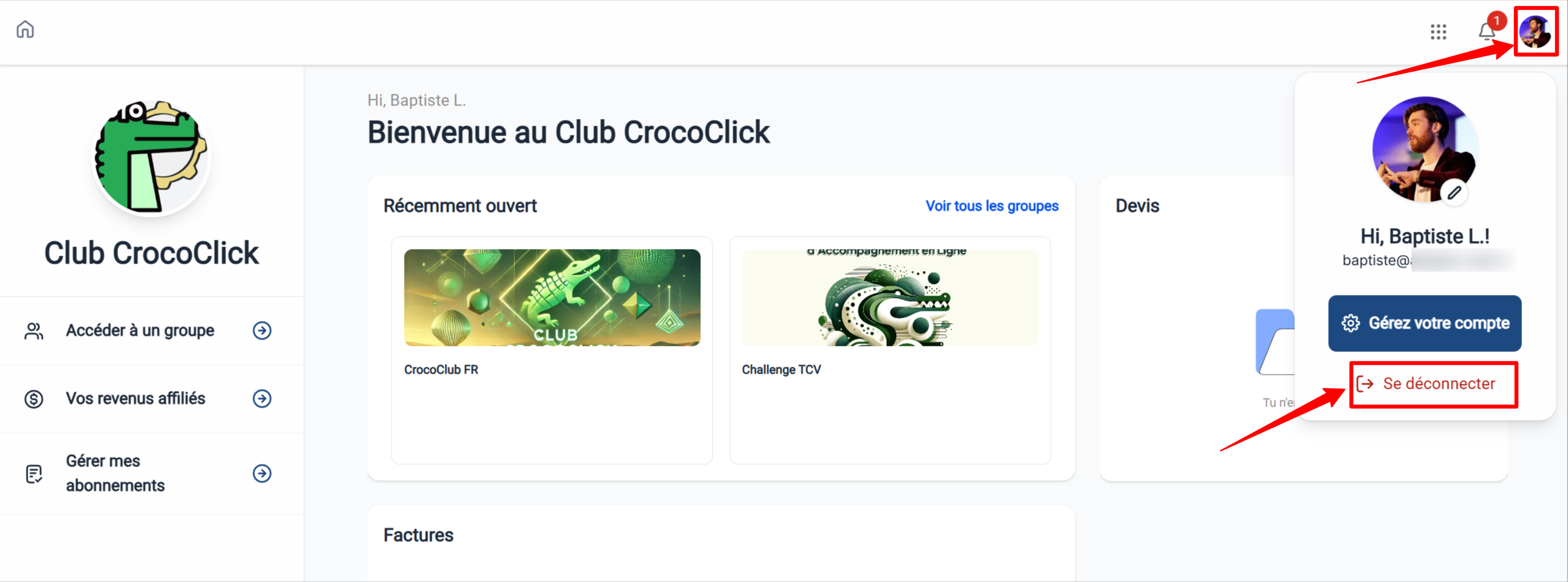
In the preview tab, click on your profile (or account icon) in the top left corner.
Select "Log out."
Reload the page
Click on "Preview" again from CrocoClick
You will then see the full version of the customer portal, with all the training courses.