[GUIDE] Understand how WhatsApp works and how it is priced in CrocoClick
Discover how CrocoClick integrates WhatsApp to automate your sales, centralize your exchanges and control your costs.
Written By CrocoTeam
Last updated 7 months ago
Introduction
This guide details how CrocoClick integrates WhatsApp and helps you control the associated costs. By the end of this article, you will know:
How to configure and use WhatsApp in CrocoClick
The different types of messages and their pricing
Concrete examples of how to optimize your budget
What WhatsApp is used for in CrocoClick
Thanks to the WhatsApp Platform integration, CrocoClick transforms WhatsApp into an automated sales tool.
It's more than just a messaging channel:
It is the most widely used messaging app worldwide
(environ 3 milliards d'utilisateurs)It is a high-performance conversion lever.
(35% de taux de clics)It's a direct way to activate, re-engage, and build loyalty by ensuring that your campaign will be read.
(98% de taux d'ouverture)It is a centralized tool in your CRM, integrated with all your automations and highly targeted.
(toute la data CrocoClick est disponible pour votre ciblage)
By understanding how conversations work, optimizing your templates, and strategically leveraging mass campaigns, you can boost your results... without blowing your budget.
Understanding how WhatsApp Business and WhatsApp "CrocoClick" work
1. The 3 WhatsApps
WhatsApp (classic): Personal application used by most people.
Ideal for chatting with friends and family, but without automation or professional tools.
WhatsApp Business App: A slightly more professional version. Allows you to create a business profile, use quick replies, and tag conversations, but still no automation.
WhatsApp Business Platform (API): The professional solution that allows developers to integrate WhatsApp into their tools (including CrocoClick). It allows you to automate your messages, send mass campaigns, and track all your conversations in the CRM and unified inbox.
However, there are three drawbacks to WhatsApp Platform (API):
Each "initial" message template is subject to a fee (more details below).
You cannot send a message without using a template if the person has not sent you a message in the last 24 hours.
💰 Each initial "template" message is subject to a fee
→ You have to pay as soon as you send a message to a contact who has been inactive for more than 24 hours.⏳ You cannot send free messages outside the 24-hour window
→ If the customer has not written to you recently, you are required to use a template that you have created in advance.📱 Incompatibility with your WhatsApp Business app
→ Once your number is linked to the API, you cannot use it on your phone. 1 number = 1 WhatsApp (personal, business, or platform)
BUT since November 1, 2025, the problem has been solved thanks to the arrival of Coexistence.
2. WhatsApp Coexistence: a revolution
WhatsApp Coexistence allows you to use the same number on both your WhatsApp Business app and CrocoClick...
...and synchronize them!
Since November 1, 2025, you can keep your usual WhatsApp while taking advantage of CrocoClick's automation and CRM.
In concrete terms:
Your mobile app works as before (and you can reply unlimitedly, free of charge, as before)
Your conversations are synchronized with CrocoClick
You can use WhatsApp CrocoClick in "Platform" mode, with its advantages and disadvantages (which are now very few!)
💡 What you need to understand: On CrocoClick, WhatsApp still follows the rules of the WhatsApp Platform: you can reply freely for 24 hours after the customer's last message, then you must use a template if you want to follow up and they have not replied.
But thanks to Coexistence, you have an alternative:
➡️ If the 24-hour window is closed, you can simply continue the conversation from your WhatsApp Business app (free of charge).
➡️ And as soon as your customer replies, the window automatically reopens on CrocoClick — and you can take back control on the CRM side, 100% free of charge.
In short: Coexistence is the freedom of mobile + the power of CrocoClick, without any interruption.
💡 TIP: To activate coexistence on your CrocoClick account, read our article"Connect your current WhatsApp Business to CrocoClick with Coexistence"
3. Uses of WhatsApp Business & WhatsApp CrocoClick
💡 Summary
Use your mobile app for natural and quick exchanges with your customers.
Use CrocoClick for automation, mass campaigns, and a unified inbox connected to your CRM.
And thanks to Coexistence, both work together on the same number without any interruption.
💡TIP: You can use the LeadConnector app to access WhatsApp Crococlick on your mobile device.
3. Difference between "templates" and "free messages"
Templates (proactive notifications): must be pre-approved by Meta before sending and are subject to a fee. There are three categories of templates (utility, marketing, and service) with different pricing.
Free messages (responses to a user message): free exchange during the 24-hour window following the last user interaction.
4. Understanding the concept of "Conversation"
Every time a customer sends you a message on WhatsApp, a free 24-hour window automatically opens for the WhatsApp Platform.
During this period:
You can reply freely and free of charge, without using a template.
You can send as many messages as you want, including automated messages (using the "free message" action), as long as it is within this window.
If you want to follow up or contact your customer after 24 hours without a message, you must use a paid WhatsApp template (pre-approved by Meta).
(Alternatively, you can send them a message on WhatsApp Business if you have coexistence enabled).
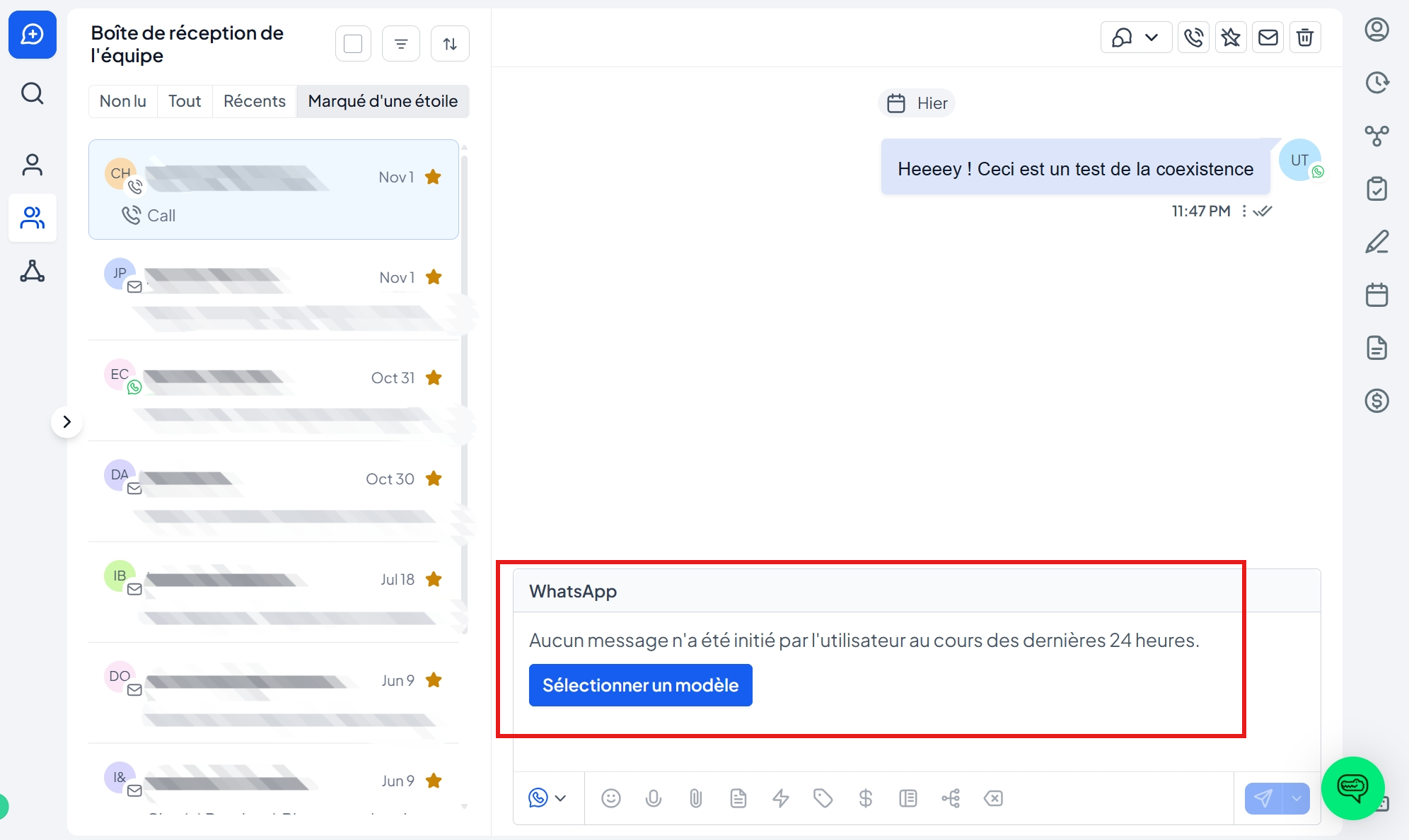
Here is an example of what is displayed on CrocoClick when you are outside the 24-hour period:
How to use WhatsApp in CrocoClick
Feature #1: Provide customer service via WhatsApp and centralize your discussions
Respond to your prospects and customers directly in the Conversations tab.
All channels (WhatsApp, email, SMS) are brought together in one place.
💡TIP: If a customer has not sent you a message in the last 24 hours, you must use a template to initiate a conversation.
Or
use the WhatsApp Business app on your phone if you have coexistence enabled
Feature #2: Send mass WhatsApp campaigns
Send large-scale marketing templates to segments of your list (inactive customers, VIP leads, program members, etc.).
Ideal for reviving your list on one of the most widely used channels in the world.
Feature #3: Set up WhatsApp messaging in your automations
Create automations in CrocoClick to trigger the automatic sending of WhatsApp messages:
New lead generated via ad ➝ welcome message
Order placed ➝ confirmation + tracking link
Appointment reminder ➝ 1 day before, then 1 hour before
The 3 Types of Templates
Pricing for the WhatsApp option in CrocoClick
WhatsApp integration in CrocoClick works with two types of costs:
A fixed monthly subscription
A variable cost per conversation (via WhatsApp templates)
Unlike SMS, WhatsApp charges per conversation, but in CrocoClick this translates into a cost each time a template is sent (for conversations initiated by the company).
1. WhatsApp monthly subscription in CrocoClick
To activate WhatsApp in your CrocoClick account, a subscription of $19.99/month is required.
Once the subscription is active, you can:
connect as many numbers as you want
send as many messages as you want
use all WhatsApp features (automations, campaigns, transactional messages, etc.)
💡 Tip: If you use the WhatsApp coexistence feature, only one number can be connected at a time.
2. Cost per message: WhatsApp template prices
WhatsApp only charges for conversations initiated by the company, and prices depend on:
the recipient's country
the type of template sent:
Marketing
Utility
Service (when the conversation is initiated by the customer → FREE)
Here are the applicable rates:
💡 TIP: These rates are set by Meta and are subject to change. Please note: the customer's country determines the rate, not yours.
Frequently Asked Questions (FAQ)
1. My customers can see the number but not my company name.
Validate your business in Meta Business Manager and your name will then appear in chats.
2. What is the main difference between the WhatsApp Business app and the WhatsApp Business Platform used by CrocoClick?
WhatsApp Business Platform allows automation via workflows, mass campaign sending, multi-user access, pre-approved templates, and CRM integration, while the classic app is limited to manual use on a single device.
3. Why does my message say "Undeliverable"?
Common causes are:
Recipient number not registered with WhatsApp
Authentication template sent to a +91 (India) number
User quality limit reached (Per-User Marketing Limit)
4. What is the "per-user marketing limit"?
Meta limits the number of marketing templates that a single person can receive in order to preserve the user experience.
Beyond the threshold, the message is blocked at no cost.
5. Can I reply via both SMS and WhatsApp in CrocoClick?
Yes. In the Conversations tab of CrocoClick, simply choose the desired channel (SMS or WhatsApp) before sending your reply.
6. My templates are not showing up.
Make sure they are approved by Meta and that you are using the correct category (Marketing, Utility, Authentication).
Check their status in Settings > WhatsApp Templates.