Automate responses to Instagram / Facebook comments with AI
Personalize responses to comments with ChatGPT in CrocoClick. Offer relevant interactions on Facebook and Instagram.
Written By CrocoTeam
Last updated 7 months ago
Want to tailor your responses based on the exact comment left by the user? With CrocoClick, this is now possible thanks to the GPT action powered by OpenAI, in addition to "Respond on Comment." Find out how to do this in this article.
💡TIP: If you want to go even further, read our article on automated Comments and DMs on Instagram / Facebook to see how to trigger the sending of DMs following a comment on one of your posts.
1. Add the "GPT powered by OpenAI" action before "Respond on Comment."
Select the Facebook - User comments on a post or Instagram - User comments on a post trigger.
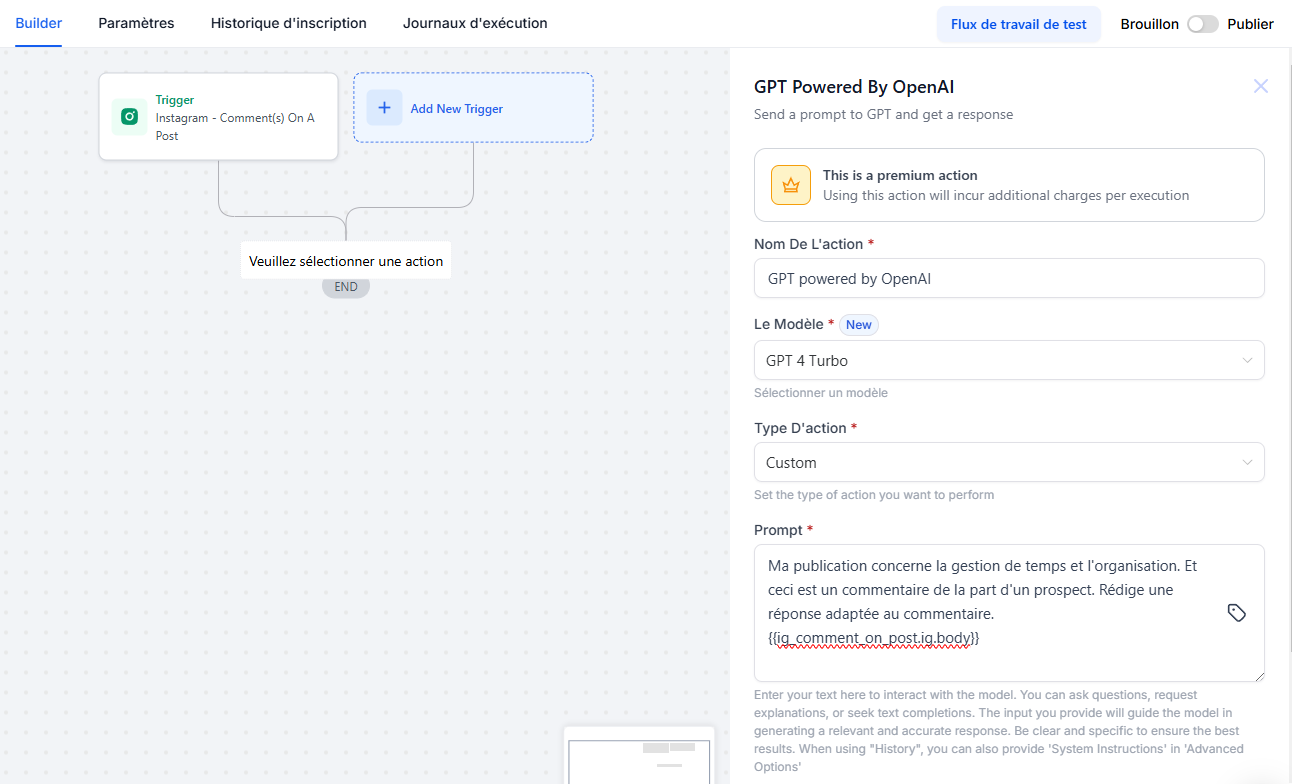
Then select the GPT powered by OpenAI action. For Action Type, choose Custom, then write the Prompt describing how you want to generate the response to the comment.
In this prompt, use the custom value selector to integrate the content of the comment: {{ig_comment_on_post.ig.body}} or {{fb_comment_on_post.ig.body}}
Save the action.
2. Configure the "Respond on Comment" action
Add the Respond on Comment action to your automation.
In the field provided for the response, open the custom value selector and choose the output from the GPT action.
This way, your comment will be automatically customized based on the content of the user's original message, providing a more relevant and targeted interaction.