How to create and use Discount Coupons in CrocoClick
Creating and using coupons in CrocoClick can boost your sales, build customer loyalty and personalize your promotions.
Written By CrocoTeam
Last updated 14 days ago
Discount coupons are a great way to attract new customers, build customer loyalty, and increase sales. In CrocoClick, you can easily create and manage coupons, whether they are for one-time promotions or recurring subscriptions. Here is a step-by-step guide to mastering this feature.
Why use Discount Coupons?
Coupons are ideal for:
Promoting sales during special events (Black Friday, holidays, launches, etc.).
Encouraging existing customers to return or buy more.
Offering discounts on recurring or one-time products.
Thanks to their flexibility, you can adjust your marketing campaigns while ensuring a smooth experience for your customers.
Prerequisites
Before creating a coupon in CrocoClick, make sure you have:
Created an offer: An offer corresponds to a product or service that you want to promote.
Configured a payment product: The product must already be active in your system for the coupon to be applied to it.
💡 TIP: If you haven't completed these steps yet, check out our guides at creating offers and payment products.
How to create a coupon in CrocoClick?
Step 1: Create a new coupon
In CrocoClick, go to Payments > Coupons.
Click on + Create a Coupon.
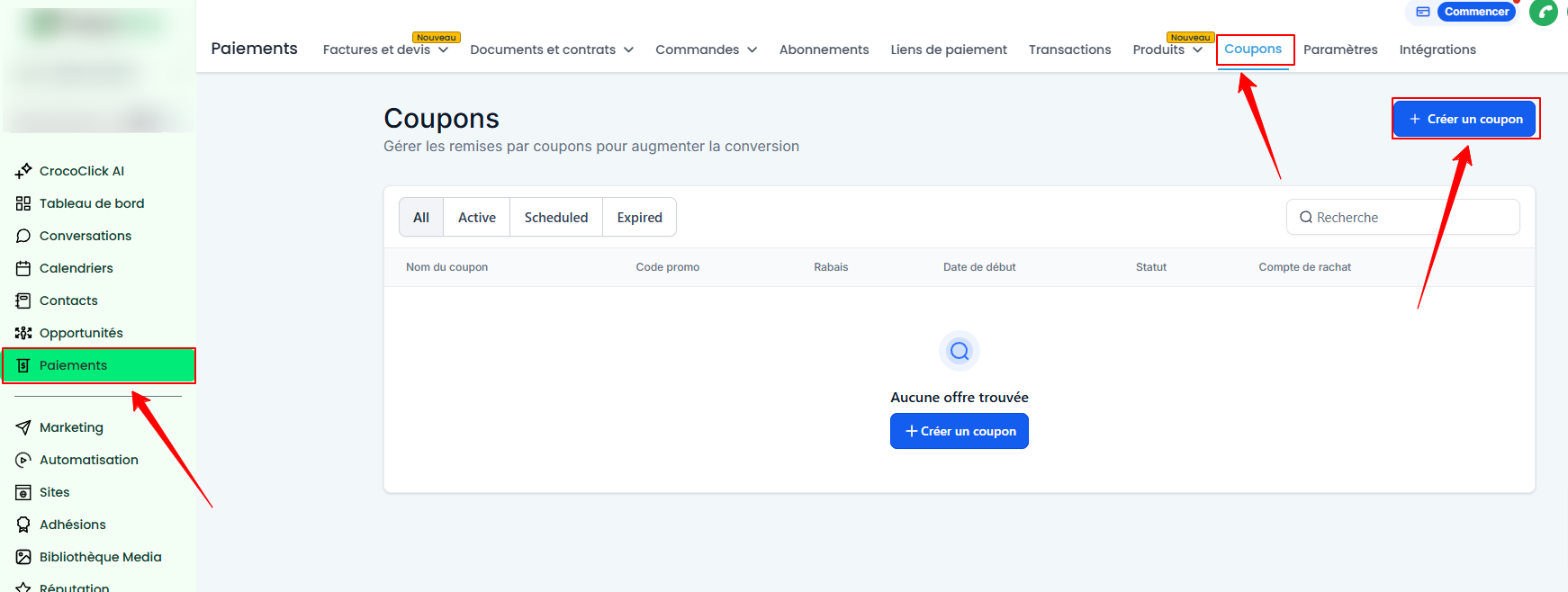
Fill in the following fields:
Coupon Name: Give it a clear and descriptive name
Promo code: This is the code that customers will use (e.g., "PROMO20").
Coupon Type: Select a percentage or a fixed amount.
Start and end date (optional): Set the start date and time to activate the coupon. If your promotion is temporary, you can also specify an end date and time to limit its validity.
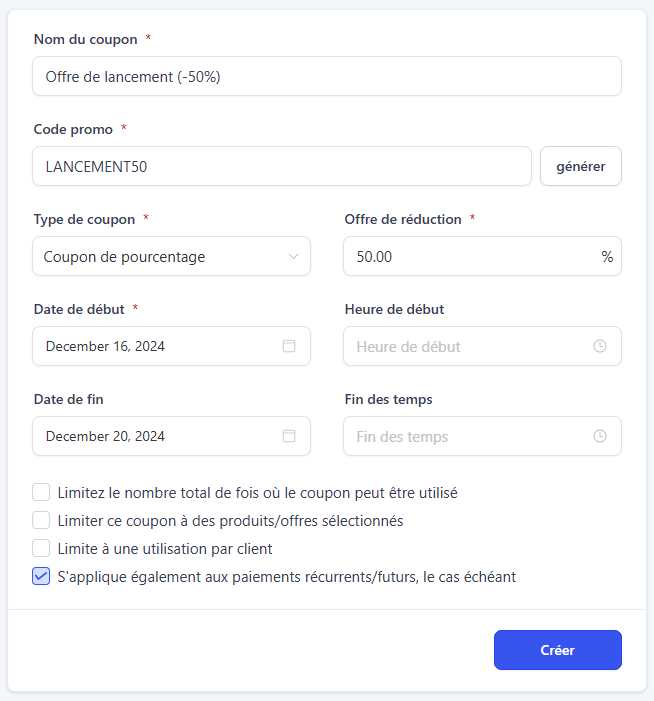
Step 2: Limit coupon usage
Adapt the coupon usage rules to your marketing strategy by checking the available limitation options.
Total Uses: Limit how many times the coupon can be used in total (e.g., 100).

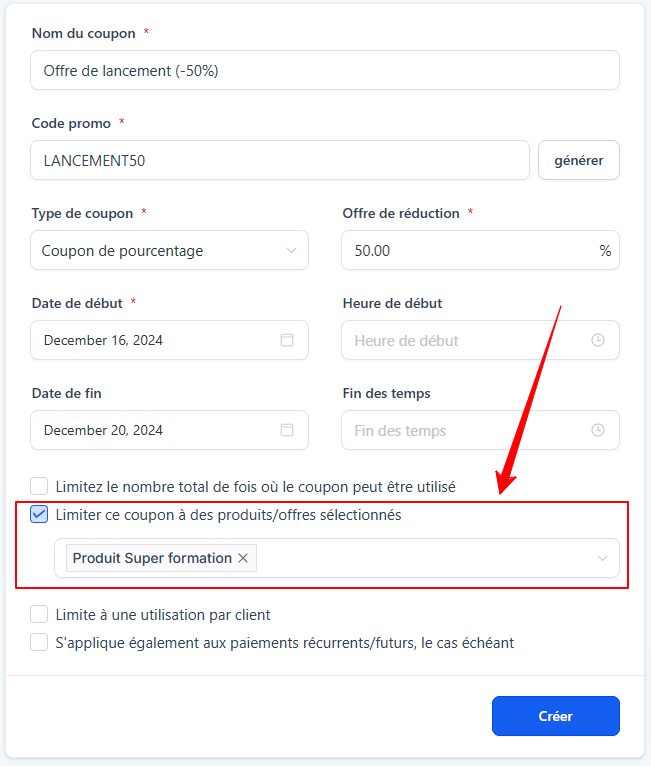
Limit by Specific Product or Offer: Determine exactly which offer the discount coupon applies to.
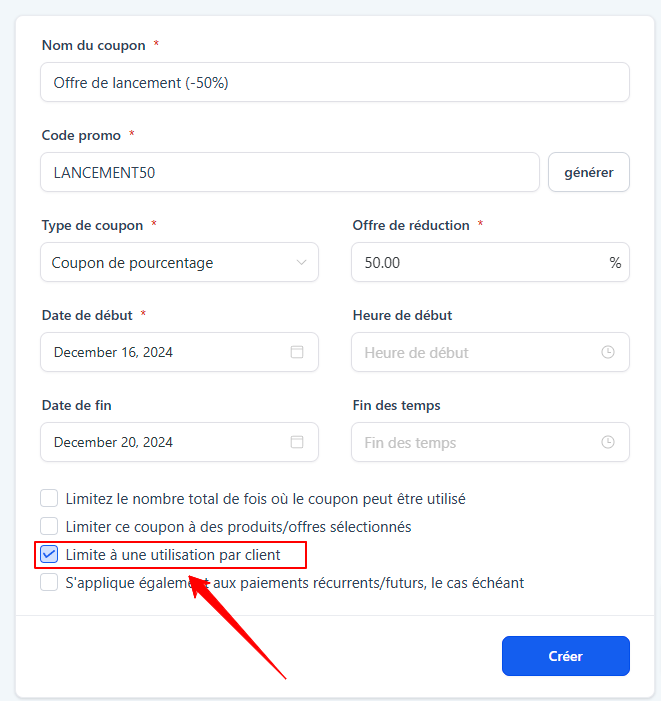
Limit per Customer: Restrict the use of the coupon to one time per customer.
Recurring Payments:
Check this option to apply the discount to all future payments for a subscription.
Leave this option unchecked to limit the discount to the first payment only.
Example: If you apply a $10 coupon to recurring payments and you sell a product for $100/month, then the product will be reduced to $90/month because the "$10" applies to all future payments
💡 TIP: This option is particularly useful for products with installment payments.
You can choose to apply the discount code only to the first payment or to all subsequent payments.
For example, for a product payable in three installments, the discount can be applied to each installment if this option is enabled.
Tips for use
Opt for a percentage coupon for installment payments: A percentage coupon is more suitable for split payments.
For example, a fixed coupon of $20 on a $100 product may skew the discount on each installment.
On the other hand, a 20% coupon guarantees a fair discount on each payment.Create simple and memorable codes: Use easy-to-remember codes such as PROMO10 or -20OFF. This makes them easier to use and improves the customer experience.
Set limits to reinforce exclusivity: Limit the number of times a coupon can be used or restrict it to one use per customer. This can create a sense of urgency and maximize its marketing impact.
Conclusion
Discount coupons in CrocoClick are easy to create and very effective at boosting your sales. With options for one-time and recurring payments, they fit perfectly into your marketing strategies. Adopt this feature today to build customer loyalty and increase your conversions.