Can I pause my CrocoClick account?
Unsubscribe from CrocoClick without losing your data. Guide to easily unsubscribe and reactivate your account.
Written By CrocoTeam
Last updated 6 months ago
In certain situations, such as a temporary hiatus from your business, it may be helpful to pause your CrocoClick subscription while keeping your data intact for future use. CrocoClick allows for this temporary suspension without losing any content or settings. Here’s how to do it.
How to pause your CrocoClick account
If you want to suspend your CrocoClick account, you can easily do so through your account settings.
Deactivating your subscription will pause your account, but all your data will be preserved.
You don’t have to worry about losing your content, training materials, settings, or other information. So, when you’re ready to resume, simply reactivate your subscription to regain access to all your content.
Steps to suspend your account
Log in to your CrocoClick account.
Go to Settings > Billing.
Click on "Want to modify / cancel subscription?"
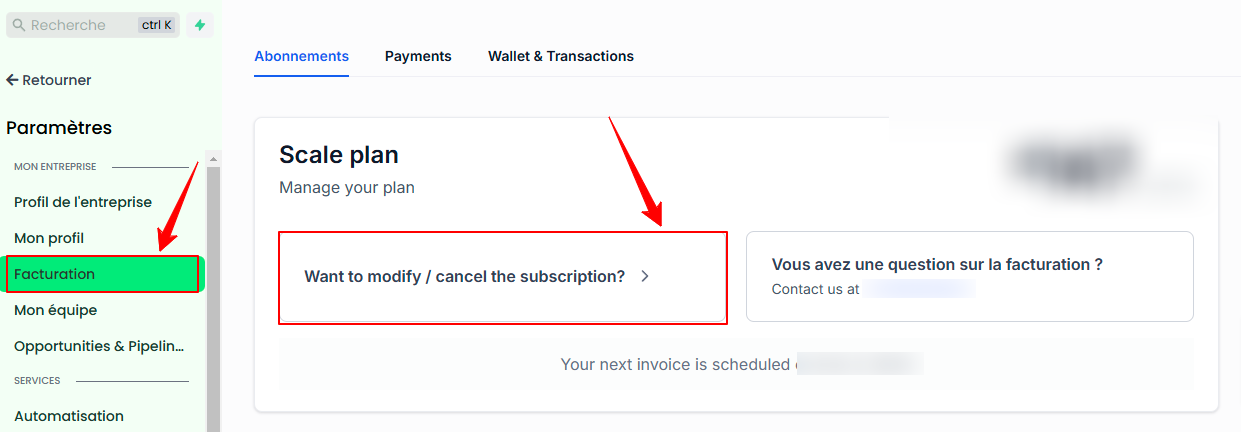
Click Cancel under Cancel Plan.
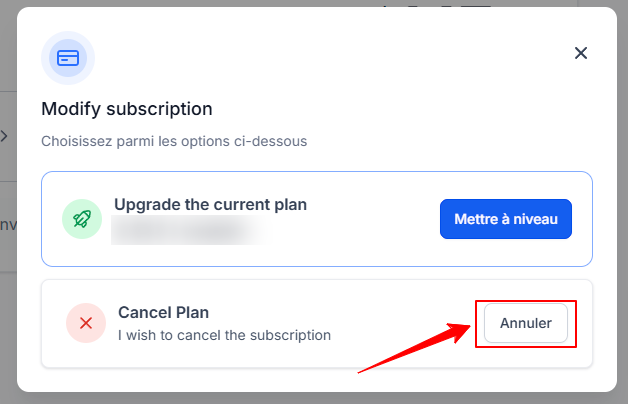
⚠️ WARNING: When you cancel your subscription, you immediately lose access to your account until it is reactivated.
If you simply want to pause the automatic payment, please contact support directly and the team will handle everything for you.
How to reactivate your account
To pick up where you left off, log back into CrocoClick and reactivate your subscription.
FAQ
1. Will I lose my data if I deactivate my subscription?
No, all your data is saved and ready to be retrieved as soon as you reactivate your subscription.
2. Is there a reactivation fee?
No, you simply need to resume your subscription by selecting the plan of your choice to reactivate your account.
Conclusion
Pausing your CrocoClick subscription is a convenient way to keep your data safe during a period of inactivity. By following the steps above, you can deactivate and then reactivate your account easily and without losing any information.