Receive my commissions as a CrocoClick affiliate
Find out how to request your affiliate commissions from CrocoClick via your affiliate link
Written By CrocoTeam
Last updated 6 months ago
Welcome to the CrocoClick affiliate community! We’re thrilled to have you on board and want to make sure you receive your commissions without any issues. Just follow these simple steps and you’ll be all set!
Preliminary Information
First and foremost, please note that payments are only processed once your commissions reach at least €100. Once this amount is reached, you can create and submit your invoice.
💡TIP: We process payments every 15 days, so as soon as your invoice is submitted and approved, the next scheduled payment will include it.
Step #1: Check your CrocoClick affiliate commissions
You can access your affiliate dashboard and view your commission balance by clicking "Club CrocoClick" in the left-hand menu on the CrocoClick platform and navigating to the affiliate dashboard.
Alternatively, you can go to club.crococlick.com/affiliate
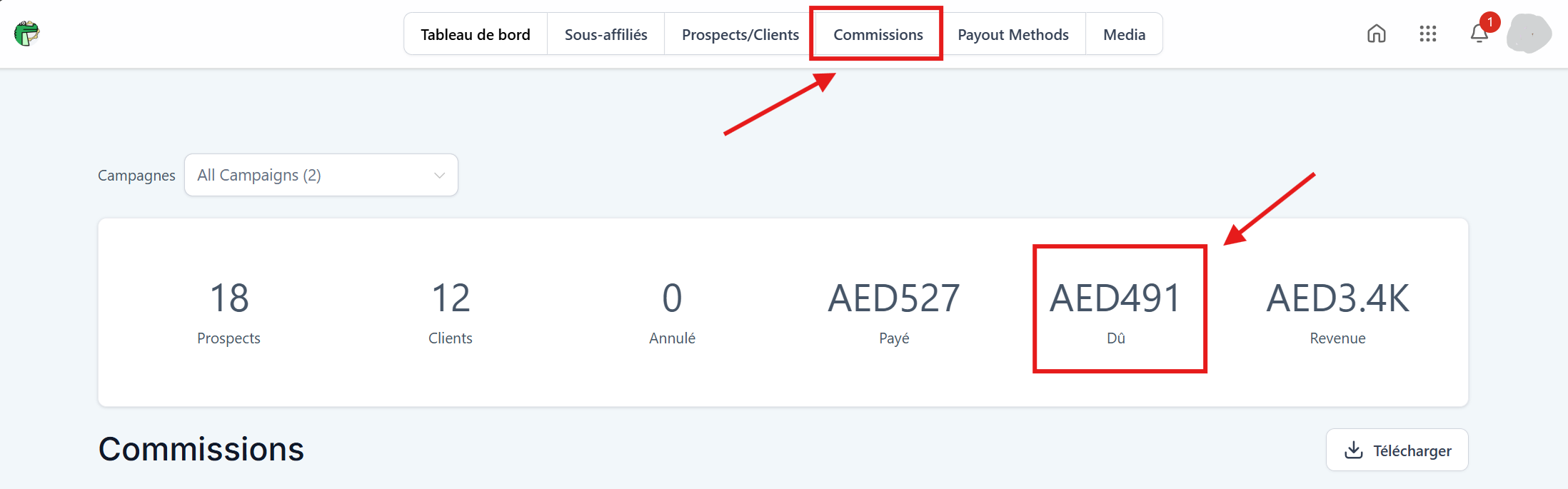
Then go to the "Commissions" tab. The amount of your unpaid commissions is listed in the "Due" box
💡TIP: Even if the currency is listed as AED, THB, or USD, it is actually EUR. You can therefore enter the amount as is.
For example, in the screenshot below, the commission due is €491.
Step #2: Create your invoice for CrocoClick
In order for us to send you your commissions, you need to create an invoice and send it to us.
Here’s how to structure your invoice:
Payable to:
Alligators Group, LLC (our legal name)
131 Continental Dr, Suite 305, Newark, DE, 19713 US (our address)
EIN: 30-1452362 (Tax ID)
What your invoice must include:
Issue Date: the day you create the invoice.
Invoice number: Choose a unique number to keep track of it.
Description: "CrocoClick affiliate commissions for the period [month or dates of the period]."
Amount: the amount displayed in your affiliate dashboard (the one that reflects your earnings!).
💡TIP: Don’t forget your bank details. Include your IBAN and BIC/SWIFT code on your invoice so our transfer goes exactly where it’s supposed to.
Step #3: Submit the invoice
Go to our invoice submission form below, upload your document in PDF format, and fill in all your information.
Once you’ve verified your information, click “Submit.”
👉 Invoice Submission Form available by clicking this link, or directly below:
Step #4: Be patient—your payment is on its way!
We process payments every two weeks (every 15 days).
Once your invoice is approved, it will be included in the next payment cycle.
FAQ: Frequently Asked Questions
1. What if I haven’t reached €100 in commissions yet?
No worries! Your commissions keep adding up. As soon as you reach €100, you can create and send your invoice for the next payment.
2. I don’t have an invoice number. Can I make one up?
Yes! You can choose a numbering system that works for you, as long as each invoice has a unique number.
3. Can I invoice for more than one commission period at a time?
Yes! If you have several months of unpaid commissions, you can include everything in a single invoice, specifying the exact period.
4. How long does it take to receive payment?
Payments are made every 15 days. Depending on when you submit your invoice, the transfer may arrive in the next cycle. Once the transfer is sent, the processing time may vary depending on your bank.
5. I submitted an invoice, but I still haven’t received the transfer. What should I do?
If it’s been more than 15 days since you submitted it, send us a quick message with the invoice details, and we’ll check the status of your payment.
6. Can I receive my commissions via PayPal or another method?
For now, payments are made exclusively via bank transfer, so please ensure your IBAN and BIC/SWIFT information is correct.
Have a concern or a question?
We’re here to help! Feel free to contact us via the chat box in the bottom right corner if you need clarification (or by email at affiliation@crococlick.com)