3 Ways to market your products and services
Discover how easy it is to sell your products and services on Crococlick using 3 essential methods: Payment Links, Direct Checkout or Sales Tunnel
Written By CrocoTeam
Last updated 7 months ago
When you are ready to sell a product or service on Crococlick, you have three main options for managing your transactions:
Direct checkout (only for Training Offers)
Payment links
Sales funnels
Each method offers different levels of customization and control, adapting to your specific needs as an entrepreneur.
Here is a detailed guide to help you choose the sales method that best suits your product.
1. Direct checkout (only for training offers)
Direct checkout is generated automatically when you create a new offer in Crococlick. This method is ideal for quick sales with a fixed price and a simple payment page.
Specific features:
Automatic configuration: As soon as you create an offer, a product is generated and a direct payment link is ready to use.
Basic customization: You can customize certain elements such as the price and product description, as well as add upsells to maximize your sales.
Fast and efficient: If you don't need multiple payment options or a lengthy sales process, direct checkout saves you time and allows you to launch your product immediately.
How to do it:
Simply click on "get link" on the offer customization page to get the direct checkout link.
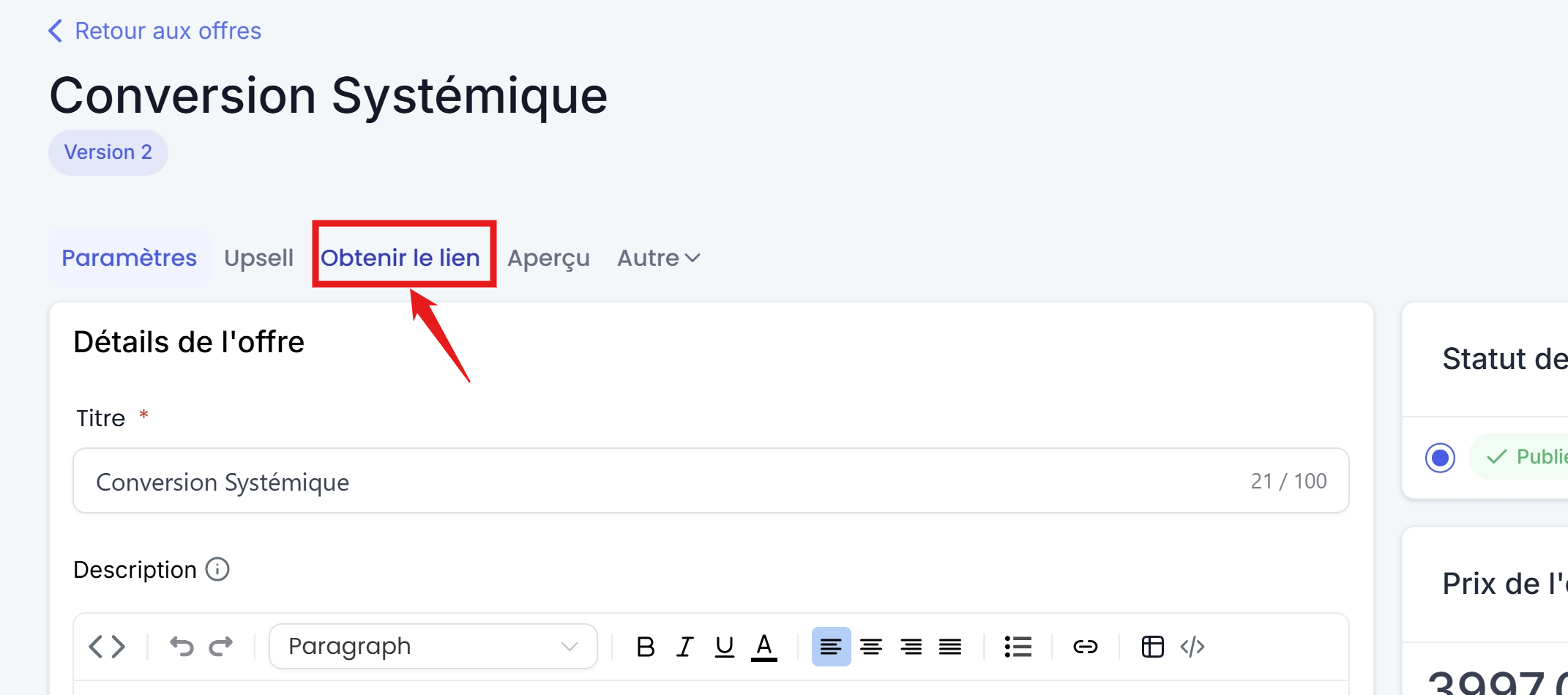
Example of use:
If you are selling a training course for $500, creating your $500 offer automatically generates a "direct checkout" link that allows you to get a payment page in minutes and share the link directly with your audience.
💡 TIP: Direct checkout is limited to a single price and basic customization. If you need more flexibility (payment in installments, etc.), it may be worth considering other methods.
2. Payment Links
Payment links offer more flexibility than direct checkout while still being quick to create. You can create multiple payment links for the same product, allowing you to offer different payment options.
Specificity:
Link to Products: A payment link is linked to a price/payment method for your product. If you have multiple prices/payment methods for the same product, you will need to generate one payment link per price/payment method.
Easy management: You can quickly generate multiple links for the same product and share them across different sales channels (website, social media, emails, etc.).
Quick customization: Although limited, the payment page can be customized to reflect your brand and include product-specific information.
How to do it:
Go to Payments > Payment Links and click on "create a new payment link" to configure your link.
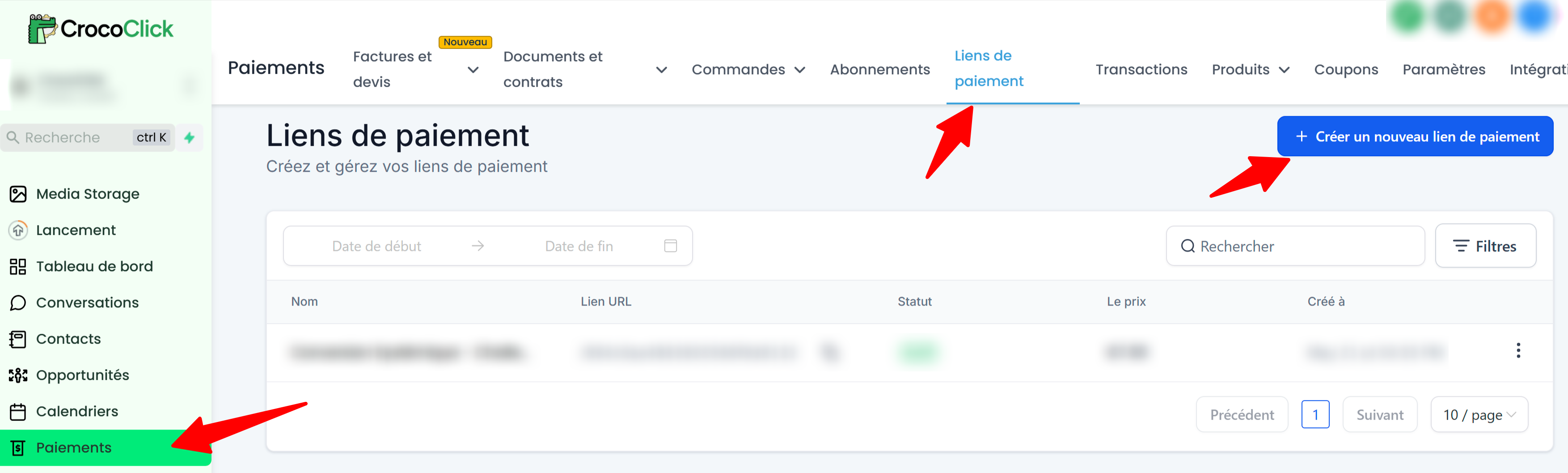
Example of use:
If you offer a product for $1,000, you can create one link for a single payment and another for a three-installment payment, giving your customers more choices than with "direct checkout."
Then simply put these two links in two different buttons on a page, or give both links to the customer.
💡 TIP: For more information, see our detailed article on creating and customizing payment links in Crococlick.
3. The Sales Funnel
The sales funnel is the most comprehensive method for selling your products. It is an advanced strategy that allows you to guide your prospects through a "shopping cart" before finalizing the purchase, while optimizing the chances of conversion.
Specific features:
Total customization: Simply create a "shopping cart" page, or set up a complete sales journey with a sales page, upsells, a personalized payment page, and a thank you page, etc. You have total control over every step of the user experience.
Shopping cart customization: With the CrocoClick page editor, you can customize the shopping cart and create a 1-step order (form to be filled out with the prospect's information AND banking information) or a 2-step order (form to be filled out with the prospect's information THEN a second form with banking information), allowing you to retarget "abandoned carts."
Conversion optimization: By adding upsells or special offers (additional sales), you can increase the average value of your orders. Sales funnels are designed to maximize sales through a well-structured sales pitch.
Tracking and analysis: You can accurately track your users' behavior at each stage of the funnel and adapt your strategy based on the results obtained (conversion rate, cart abandonment, etc.).
How to do it:
Go to one of your funnels or websites and click on the sales page where you want to integrate a one-step or two-step order form.
Once in the page builder, add the "1-step Order Form" or "2-step Order Form" block.
Save your page.
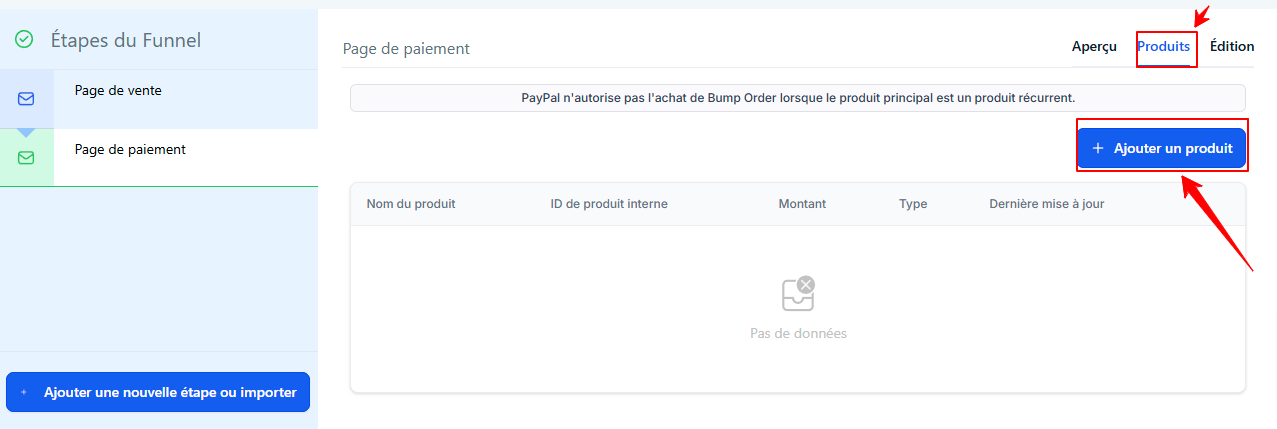
All that's left to do is associate your product with the sales funnel. To do this, go to the funnel step, then to the Products section, and add the product you created by clicking on + Add a product.
Select the Product and price, and press Save to save.
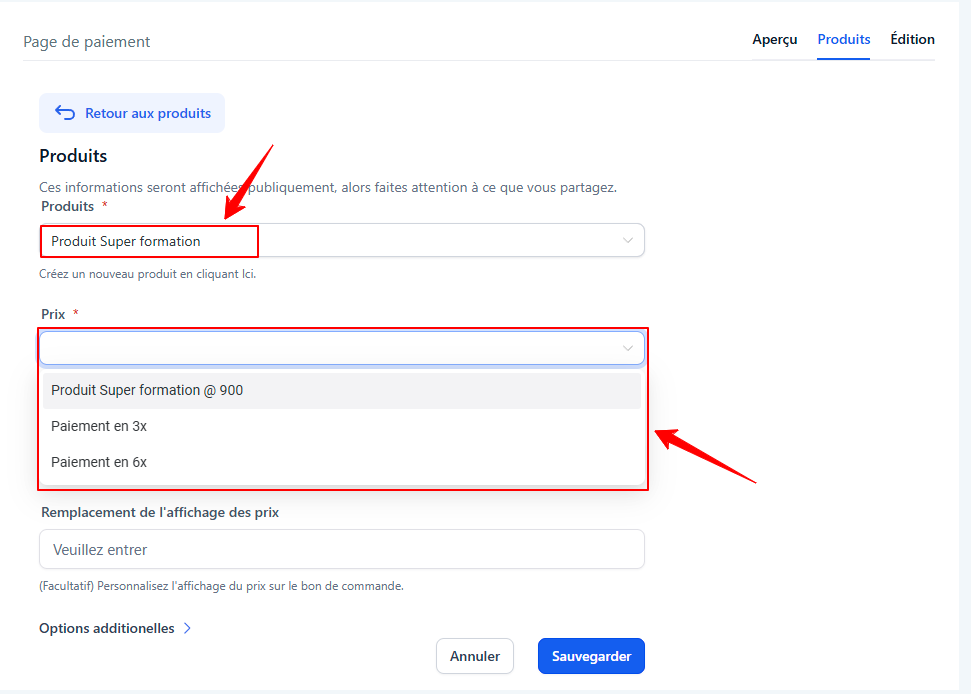
If you have configured several price options (for example: payment in 1x, 2x, and 3x), add the product several times and select each price option.
Example of use:
If you sell a high-value training course (e.g., $2,000), a sales funnel allows you to guide your customers through a detailed sales page, then add upsells (additional offers) before or after the purchase is finalized, thereby increasing your revenue.
💡 TIP: For more information, see ourcomplete guide to creating a sales page with order form in Crococlick
Frequently Asked Questions (FAQ)
If I sell a training course, how can I ensure that the customer automatically receives access to their training after purchase?
No need to send access manually: CrocoClick manages this automatically, as long as your PRODUCT is linked to a TRAINING OFFER
💡 TIP: To understand this concept, read our article explaining the difference and links between Training, Product and Offer
Direct Checkout (Training Offers): When you create an offer linked to a training course, the system automatically generates the payment link (direct checkout). As soon as the customer makes a purchase, they receive a confirmation email and their account is created with immediate access to the training course in question.
Payment Link: If you use a payment link linked to a product containing training, the principle is the same: once the payment has been validated, CrocoClick automatically assigns the training to the customer.
💡 TIP: To customize the automatic email sent when a training offer is obtained, read our article"Personalize welcome and login emails"
👉 Important: just make sure that your product is linked to a training offer in CrocoClick
OR
That you have created an automation to give access to the training offer.
Without this link, the customer will pay... but will not have access to the training.
💡TIP: To learn more about sending login information to one of your learners, read our article: "How to open access to training for a contact"
Can I offer multiple payment options (1x, 3x, 6x)?
Yes, but not with Direct Checkout (limited to 1 price).
👉 Use Payment Links or Sales Funnels to offer different options (single payment, payment in installments, etc.).
Simply create several "prices" within your product, then select them in your payment link or sales funnel.
Conclusion: which sales method should you choose?
The choice of method depends on the complexity of your product and the level of customization you need.
Direct Checkout: Suitable for simple, fixed-price products when you want a quick process without additional steps.
Payment links: Ideal if you need to offer multiple payment options without having to set up a complete sales funnel.
Sales funnel: Best for complex products or when you want to maximize your sales with advanced strategies, such as upsells and complete customization of the customer journey.
Whether you choose the simplicity of direct checkout, the efficiency of payment links, or the power of a sales funnel, Crococlick allows you to tailor your sales method to your strategy. Each option gives you flexible and effective tools to achieve your sales goals.